רשומות

How to customize your Siebel application toolbar
תמונה
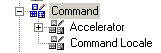
Want to customize your tool bar? here is how you can do it. Depending upon where you want your button or control to go. You will have to select the appropriate toolbar and customixe it. In this post I will show you how to create a custom button to logout from your application. Step 1:   go to Command Object in your Object Explorer and query for "Logout " (If you cannot see this object. In tools go to View | Options | Object Explorer tab | check the Command Object) Step 2: Copy the the Logout command object and rename it to 'Logout New' (you could use the same one too) Step 3: Go to the toolbar Object in your Object Explorer and query for "HIQuery" toolbar(you could use another toolbar depending on where you would like to see your button on the application) Step 4 : click on the toolbar Item child object. Create a new record called ' Logout ' with the following properties - Name : Logout - Command : Logout New - Display Name : Logout   Step 5: ...
How to add a Screen Tab image to your siebel application

תמונה
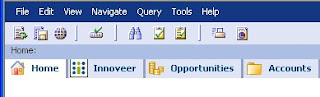
Hi all, This is usually a part of Branding, adding your own images/icons to the siebel application like I have added below. Required Configuration : Add the Screen on the Page tab. Only the image will be visibl e. In Bitmap Category create a new record with a unique name and the required parameters. In Bitmap child object create a new record with name ‘Screen Tab’ and in filename specify the name of the file with the .gif extention. To specify the properties of ‘Logo’ go to menu -->View-->Windows-->Properties Windows. Now you will be able to edit the ‘Height’ and ‘Width’ properties. In the Object Explorer goto Screen --> Create new/Use existing screen and give the required properties. Then goto Siebel Tools menu--> View-->Windows-->Properties Windows. Specify the name of the Bitmap Category in the Bitmap Category Property as displayed in the below figure. Compile all the Objects. Clear internet history and files. Reopen the Application. Yo...

Integrating Siebel 8 With Oracle SOA Suite

Here is a complete documentation of how to pull Siebel data from an external application(JDeveloper) Cheers!

How to Launch an external executable from Siebel

There are many ways of doing this. Here are two - 1. The first approach is a bit easier than the second. The script is written in the Applet_Load event of the Applet Browser Script. You can also invoke the executable file from a button click etc... Script function Applet_Load () { //Instantiate an ActiveX shell Objext. var wshell = new ActiveXObject("WScript.Shell"); var oFSO = new ActiveXObject("Scripting.FileSystemObject"); //the path of where this file has been installed sDirectory = "C:\\PROGRA~1\\WINDOW~1\\ACCESS~1\\"; sFile = "wordpad.exe"; sFilePath = sDirectory + sFile; //Check if the .exe file is installed if(oFSO.FileExists(sFilePath)) { execRet = wshell.Run(sFilePath, 3, false); } else { alert("You do not Wordpad Installed."); } oFSO = null; wshell = null; return ("CancelOperation"); } Now, When the applet loads wordpad will open. 2. T...

Siebel VB to eScript Converter

תמונה
Hey Amigos, Here is a utility from Siebel Systems that converts VBScript to eScript. After conversion it is not totally done but you should be 85% on your way. Click on the below icon to download the converter. Cheers!

How to kill Siebel process

Hi Folks, Here is an Interesting tip shared by my Colleague Venus Hindocha about how to kill your Siebel.exe Process by avoiding the hassle of going to task manager and killing it there. you can use the foll command from Start -> Run or put it in a batch file taskkill /F /IM siebel.exe Some theory: Taskkill: Ends one or more tasks or processes. Processes can be killed by process ID or image name. Syntax: taskkill [/s Computer] [/u Domain\User [/p Password]]] [/fi FilterName] [/pid ProcessID]|[/im ImageName] [/f][/t] /f : Specifies that process(es) be forcefully terminated. This parameter is ignored for remote processes; all remote processes are forcefully terminated. /IM (ImageName): Specifies the image name of the process to be terminated. Use the wildcard (*) to specify all image names. More Details

What Is the Calculation Logic Behind the Conversion Function RowIdToRowIdNum?

In Siebel versions 6.x and 7.x, there are several number fields such as SR Number, Agreement Number, Asset Number, and Invoice Number which have the Pre Default Value = Expr: 'RowIdToRowIdNum ([Id])'. RowIdToRowIdNum is a function used in calculated expressions. This function converts an alphanumeric ROW_ID to a unique, pure numeric ROW_ID. The conversion is performed for digits and letters after or before the hyphen '-'. The formula used by RowIdToRowIdNum is the following: [Last digit or letter * 36^0] + [Second to last digit or letter * 36^1] + [Third to last digit or letter * 36^2] + ...+ [Second digit or letter * 36^n-1)] + [First digit or letter * 36^n] By design, values of letter A is 10, B is 11, C is 12 ... Y is 34, and Z is 35. Example 1: Take the example of ROW_ID = 1-5GYG0. Start converting from the last digit or letter from right to left, which is 0 in this case: 0 * 36^0 = 0 Conversion of second t...