רשומות

מוצגים פוסטים עם התווית Debugging

How to Optimize Siebel Application Login Time

תמונה
Recently, we've had a lot of users complaining about the homepage taking too long to load. Why does the login page take long to load? What happens when the login page loads. Below are some of the tasks that Siebel performs while loading the application. - Verifying Application Schema Version - Loading / validating State Models (checks whether or not the expiration date is greater than current date) - Verifying State Model values for transition - Loading / Validating Personalization rules and rule sets for each event on applets, Business Components, - - Business services and application - Loading / validating user profile data. - Loading / validating System preferences - Loading localized data (Phone format, date format, time zone, currency etc) - Loads user reporting hierarchy - Loads application view-responsibility data. - Message Broadcast (This can be inactivated by inactivating the Message broadcast bar) The reason behind such a behavior is that some of the static data (locali...
The Siebel Blackbook

How to Stop a BusComp_PreWriteRecord

Many a times we find ourselves in a situation wherein we think our configuration is correct, but why the hell can I not see my changes. Tiny things make a big difference in Siebel and we spend hours trying to figure out whats going wrong, and more often than not its just a silly property that we may have overlooked :)...read on When the current record of a BC has beeen modified, the user cannot step off the record without either saving or undoing the record. (Under normal circumstances, saving is done automatically when stepping off, so the user does not need to save the record manually.) When calling RaiseErrorTest in BusComp_PreWriteRecord, or when returning CancelOperation from this event, the current record does not get saved to the database; however, it remains modified, and thus the user cannot step off the record. For the user, after clicking away the custom RaiseErrorText message, it may appear as if the system suddenly gets unresponsive as they cannot step forth and ba...

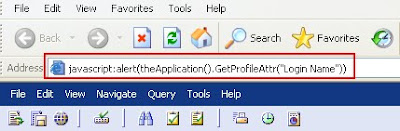
Get and Set value of Profile Attributes Profile Attributes from the Application

תמונה
The other day I was doing a development task related to scripting. I was using a lot of Profile Attributes in my logic. However, I had to put alerts in my code to check whether the profile Attributes were being set correctly. I had to revisit the code a lot of times. That's when I came accross this trick on Siebel Unleashed. javascript:alert(theApplication().GetProfileAttr("Login Name")) Place the above code in the address bar of your Siebel Application as below and hit Go. A popup is displayed with the value of the Profile Attribute. You can go either a GetProfileAttr or even a SetProfileAttr   javascript:alert(theApplication().SetProfileAttr("TEST", "Only Siebel")) This trick can very well be used for debugging purposes. Cheers!