רשומות

מוצגים פוסטים עם התווית Workflows

Siebel Runtime Event and Workflow Process

In Siebel world, Runtime Event (RTE) and Workflow Process seems to be very good friends. Both understand each other pretty well. Whenever there is a need to implement any functionality on based of some trigger, these two friends comes hand in hand. I usually make use of both of them most of the time to make a good solution. Few things to keep in mind when we use them for any requirement:

Error Workflow Process

The biggest difference between time and space is that time can't be resued. So better reuse the existing one in order to earn some time. Reusability is one the fundamental block of siebel. Be it configuration or scripting, siebel always advocate usage of existing ones. One to enrich this feature is "Error Process Name" property at the workflow level. This property is used to specify the workflow process which should be executed whenever error occurs in the base workflow. One can create a generic workflow for error logging mechanism and can specify that workflow in the "Error Process Name" property. This workflow can act as universal exception handler for logging error across the multiple workflows. One of the interesting features here is the passing process properties from the base workflow to the error workflow. It should be kept in mind in order to pass user defined process properties to the error workflow, we must redefine those process properties in the erro...

How to send email containing multiple child records data?

I am pretty sure you will find this post very interesting, if you ever get a requirement to send a email in HTML format and email should have the details of the child records(dynamic data) as well.XSLT (XSL Transformation) can do wonders for this kind of requirement where the basic idea is to get data in XML hierarchy from Siebel (which you can easily do via EAI Siebel Adapter and convert it into

Hidden Methods - UpdateRecord

Siebel is mysterious. Along with those magical user properties there exists hidden methods that can do wonders for you. It is a real Archimedes-Eureka-Feeling when we encounter any of these hidden methods in siebel. Recently i was struggling with Update Siebel Operation Step in Workflow with some context issue till i found "UpdateRecord" hidden method for "Inbound E-mail Database Operations" business service. This method is not displayed in the available list of methods for this business service but however can be comprehensively used in the workflow (we can verify with Business service simulator). Usage: Business Service: Inbound E-mail Database Operations Business Service Method: UpdateRecord Method Argument: BusComp - Name of the Business Component BusObj - Name of the Business Object Id - Row ID of the record to be updated Field: FieldName1 - Value to be updated Field: FieldName2 - Value to be updated Field: FieldName3 - Value to be updated The only curse...

Old Value - New Value

תמונה
The requirement of auditing the value changes in key fields is one of the common requirements. One can use audit trail or resort to activities for maintaining log. We also faced the same requirement of capturing the Old Value-New value pair in activities, whenever status of Service Request is changed. There are multiple script less solution available for this. But the one which excited us was the introduction of "GetOldFieldValue" method of buscomp. As per bookshelf "This method can be called by using a script in the PreWriteRecord event to retrieve an old field value if needed. This method takes an input parameter, which must be a valid field name, and returns a string containing the old field value." Primarily this method is used for EBC's but one can use this method for any buscomp with effective use. We created a workflow which is used to read older value and new value and then create activity. 1 - Fetch Old Value Business Service Name: SIS OM PMT Service Bu...

50 Up!!

“Statistics are like a bikini. What they reveal is suggestive, but what they conceal is vital.” - Aaron As i write my 50th post, it feels good to be quantum of blogosphere. Here we will discuss one of my favorite topic " Workflows ". A lot has been suggested about activating multiple workflows but vital thing in this post is importing/exporting multiple workflows from one repository to another and deploying and activating them in one go. I have posted two workflows here. One is for multiple export of workflows and other is to import and activate the exported workflows. One can download from below links. 1 - Multiple Workflow Export 2 - Multiple Workflow Deploy and Activate Usage: Multiple Workflow Export - Import this workflow in your tools. Modify following input process properties as per your need. ExportFolder : This is the name of the directory where you want to keep the export of XML files.For eg, "D:\Workflow_Export" Repository : Name of the repository from w...

"IS UPDATED" in Workflow Policy

תמונה
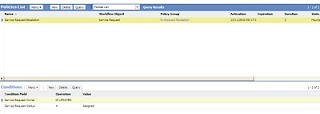
Statuary Warning: This is not for the old horses. My romantics with siebel goes on and so Siebel mysteries. Newbies better be careful while using "IS UPDATED" condition in the workflow policies. It can lead to undesirable/wrong results. Lets consider below problem statement. "Any service request which is not worked within 2 hours of assignment, i.e. Assigned status , should be escalated." The obvious solution which comes in mind is to configure workflow policy with duration and Owner Id update condition. Unfortunately it didn't work for me. The issue when using "IS UPDATED" criteria in combination with Workflow duration is that criteria is considered only at the time of the first update by the user. Until the configured policy duration has completed, all subsequent updates to the record are discarded by Workflow Policy Manager. As a result at any point of time only one record is available in "S_ESCL_STATE" table for this policy. At the end ...

ORA-03135: connection lost contact

November started with blues. I recently encountered very strange issue with the custom workflow components. I am not underrating the term strange here but i am in habit of landing into these troubles frequently. My workflows were failing on server intermittently with error log suggesting ObjMgrLog Error 1 000000044ccc6f90:0 2010-10-31 11:27:23 (oracon.cpp (3255)) SBL-DBC-00108: An error has occurred preparing a Sql statement. SQLParseAndExecute Execute 5 000000044ccc6f90:0 2010-10-31 11:27:23 ORA-03135: connection lost contact I was not sure what was causing this failure as there was no issue in the workflow as it was working fine in other environment. The more concerning factor was that there was no specific pattern for the failure of this workflow. But the best part with siebel is regardless of issue your luck never runs out. I found similar post on the siebel support[ID 762888.1] and resolution was to set the below parameter on the custom workflow process manager componen...

FINS Data Transfer Utilities

תמונה
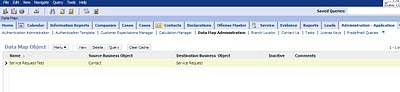
The best thing while working on siebel is you are never short of options. Recently we had requirement of updating a Service request from contact. Finally we did that using "EAI Siebel Adapter" business service. However during that time i came across another business service "FINS Data Transfer Utilities" popularly known as DTU business service. As i was not having prior knowledge of it going by the rule of not learning swimming lessons while drowning i decided not to go for it. Lately i have tried to explore this service and trust me it can do wonders. Here is a sample example update of Service Request from contact. We need to follow below steps in order to understand strength of this business service. 1 - Navigate to Site Map. Go to Administration - Application -> Data Map Administration tab. Create a new Record with following options: Name: Service Request Test Source Business Object: Contact Destination Business Object: Service Request Here the source business...

Batch Processing

Batch processing is integral part of any development and is must in cases involving escalations,auto-assignments or bulk emailing. Siebel provides multiple ways to do batch processing but one to choose depends on the requirment at hand. Lets consider an escalation scenario which involves SR reassignment to Manager when commit time is reached if it is not closed. The two possible approaches to achieve this are: 1 - Workflow Policies with Batch Mode set to True 2 -Workflow Process Batch Manager component It can be real dilemma which one to use as they say "you always have choice of selecting action but not the consequence". Both approaches have its own advantages. Lets discuss each of them. Workflow Policy with Batch Mode 1 - Create a Workflow Policy as following based on "Service Request" object with condition Status Closed Commit time >= Current Set the batch mode to True. Specify the action which will run the workflow to reassign SR. 2 - We need to schedule a ...

Purging Vs Deleting Workflow Process Instances

This is one of the important information you might be interested in, if you frequently debug a Workflow Process at run-time by increasing the Monitoring Level under "Administration - Business Process -> Workflow Deployment" view.Whenever you increased the Monitoring Level to "4-Debug", system starts capturing the WF steps details along with the each Process Property at each step, to give a better

Debugging Siebel eMail Response !!

In our Siebel application, we are using OOB functionality for creating Service Requests via emails, and yes I think you guessed it right we are using Siebel eMail Response workflows which are available in Siebel Tools and you just need to configure them as per your need and these works really well.(For people who are new to this subject, to find these workflows you need to query in Siebel tools