רשומות

מוצגים פוסטים עם התווית Automation

How to time trigger workflows through command prompt

If you have workflows in your CRM system that are required to be run everyday, but for some reason you are running them manually, this might be a good solution for you to save some time. This solution demonstrates how you can trigger your Siebel workflows at specific intervals of time on windows. For, Siebel environments on other operating systems, you will have to create a solution similar to this, the only difference being the batch file will have to be written in shell (for Linux/Unix) or the programming language that is supported by the OS. Step 1 - Write the batch file Copy the below code in a text file and save it with the .bat extension ::Set Localization   setlocal ::Gets The Parameters and sets into Environment Variables    set GTYSRV=%1    set ENTSRV=%2    set SIEBSRV=%3    set SIEBUSR=%4    set SIEBPWD=%5    chdir C:\sia81\siebsrvr\BIN       :: The workflow process name    set wf=T...
Generate Quote using Narrative Reports in CRM On Demand

תמונה
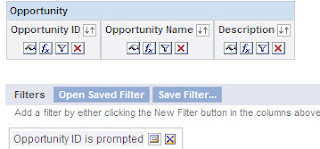
Hey Guys, One thing we all think about is how to design a simple solution to a complicated requirement and so today lets see how to create a Narrative report for a 1:M relation. As you may know Narrative Report can be used only on one record. But, using a combination of reports, we can do the a LOT more! All we need to do is create 2 reports linked to each other and add them to a Dashboard. let me show you how. Step 1: Create a Opportunity Parent Report Using Opportunities Subject Area (Reporting  or Real-Time) Add the fields you would like to use on the Opportunity Information Section of the Quote report. In Step 2: Create Layout , Add a Narrative View and use the this code Opportunity Parent Narrative View Code . Make sure you use the @"Number" symbol in the right places, or the values would display against the wrong columns. You'll notice that the values are not correct in this preview, don't worry. since this report is not being filtered from the Prompt yet, the...

Automate Siebel EIM Mapping using SQL

תמונה
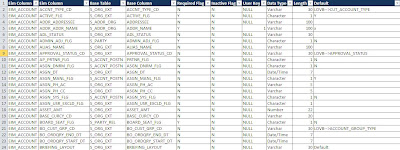
Hey Everybody, Hope you all are doing Great! It's been a long time since my last post, apologies for that! Anyway, I have decided to make up for that time and give you some great stuff! Recently, I had a LOT of people asking for a way to Automatically generate EIM Mappings. I have written a post previously called Generate EIM mapping using SQL Script . However I made some new changes that will give you more information than before. So here are the updated versions for Oracle and MS SQL Output Preview Document Links : Do what the document tells you are you're good! Automate Siebel EIM Mapping using SQL_MSSQL Automate Siebel EIM Mapping using SQL_Oracle Watch out for more interesting Stuff! Cheers! Ryan

Generating Data to UI mappings in Siebel just got easier!

תמונה
This is one of those tasks which is fairly simple to do. However, can be very time consuming considering you have to generate a mapping for an entire/multiple repositories. We've all have had to do this at some point, not enjoying it one bit! Well, here is a code that will save you some time and your sanity :) . The below code generates a screen to Applet, and an Applet to BC mapping which can be then exported to excel. Screen to Applet -  select scr.name "Screen Name"       ,nvl(nvl(ptabi.tab_text, scri.viewbar_text), scr.viewbar_text) "Screen"       ,scrv.sequence "View Seq"       ,vw.name "View Name"       ,vwi.title "View"       ,vw.busobj_name "Business Object"       ,vwti.item_num "Item Num"       ,ap.name "Applet Name"       ,api.title "Applet"       ,ap...

How to Integrate Google maps with Siebel for multiple addresses

תמונה
A few days back a client asked me if we could have Google maps integrated with their Siebel application, that would enable their reps to locate their contacts/accounts on Google maps, and find the best way to reach them based on their mode of commute. Initially, they had planned to do this for single addresses. However, I tried to convince them to go for multiple address selection. The key business driver here in my opinion would be that, the user can optimize his/her travel route based on the proximity of his/her reps, thus saving time and money. Google maps also offers a few more features like checking for traffic, avoiding tolls, taking highways etc. Google maps is really cool, and integrating it with Siebel makes it cooler ;) Really!! show me how? Step 1: The first step would be to get the Google map applet setup on your Siebel application. There are many ways to do this. For this example lets go with Mash-up your CRM with Google maps in < 30 minutes . Step 2: On...

Multiple Email Validation Script in Siebel

This post is a result of my sheer frustration for not getting this right in a 100 tries. I had been trying to validate the email addresses being entered in Siebel. I tried a lot of ways to get it to work (Data Validation Manager, Runtime events, Configuration etc) but the darn thing would just not work. I had to ultimately resort to the "boo hoo"- Script! I thought this would be useful for a lot of Siebel guys out there, will save you from all that frustration.(Checks/validates for a comma separated list of emails as well) Code: function BusComp_PreWriteRecord () {     try     {         this.ActivateField("Email Address");         if (this.GetFieldValue("Email Address") != "")         {             var sEmail = this.GetFieldValue("Email Address");             var sPattern = /((\w+...

Setting a Default Template in an Applet To Be Used With Send Email (F9)

תמונה
Hey Guys, Its been a while since my last post, apologies for the same. I have been trying to do too many things at the same time :P While doing some extensive research on Siebel's f9 send email functionality, I came across this cool feature. So if your business uses a common template to send out to its contacts from a specific applet, this feature could prove useful to you - saves you the effort of manually selecting the template. Here is how you can add a Default Email Template to your applet. Step 1: Query for the desired applet you want to set up the email template for. Step 2: Goto View > Windows > Properties Window. NOTE: If you are using Siebel versions prior to 8.x. You do not have to open the applet properties window. You should see it as part of the properties for the applet in OBLE. Step 3: In the Mail Template property enter the Email template name exactly the way it appears in the Siebel Client. Step 4: Compile and test - Now when you are on the just mod...

Skype - Siebel Custom Integration

תמונה
Want to call one of your contacts/prospects in Siebel without a lot of manual effort? now you can... Here are a few simple steps of how you could integrate Skype with your siebel application. Thank you Bernard for sharing this ! Configuration Steps - (for this example I am going to use the contacts applet) Step 1: Create a custom Business service called 'OS Skype Integration' and assign it to a locked project. place the below code in the PreCanInvokeMethod event of the Business Service function Service_PreCanInvokeMethod (MethodName, &CanInvoke) {     if(MethodName == "GetField")     {         CanInvoke="TRUE";         return(CancelOperation);     }     else if(MethodName == "TransformToSkype")     {         CanInvoke="TRUE";         return(CancelOperation);     }  ...