רשומות

מוצגים פוסטים עם התווית guest blogger

ec4u Releases Application Composer for Siebel Open UI
תמונה
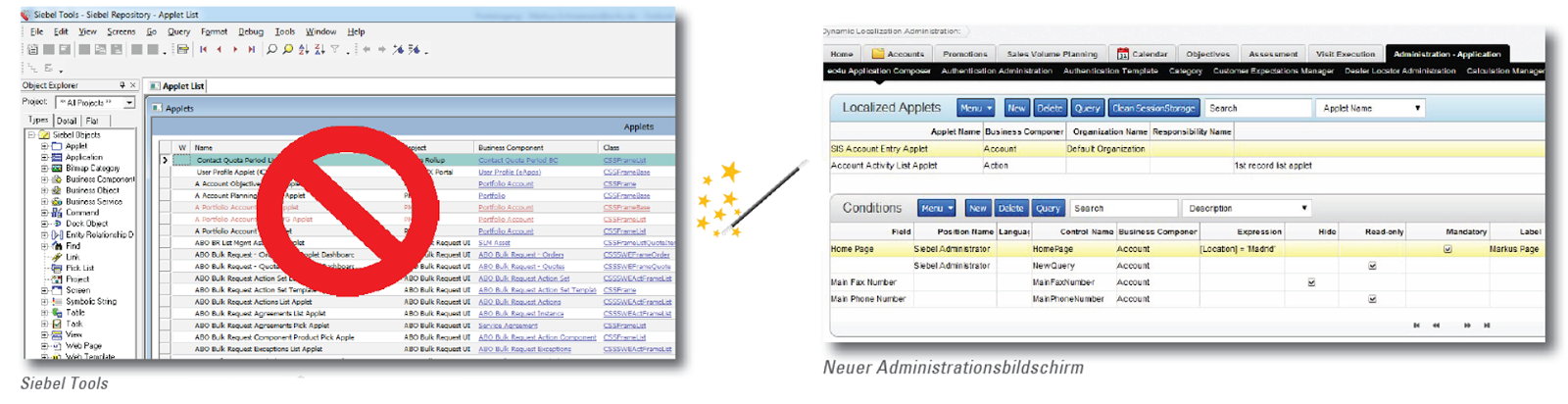
Earlier this year, I have been invited by ec4u expert consulting AG Germany to take part in a workshop. My job was to deliver Siebel Open UI training as well as discuss a new tool that ec4u planned to implement. The tool should enable administrative users to quickly change the appearance of list and form applets in Siebel Open UI without having to use Siebel Tools. I was intrigued and inspired by the presentation of the tool during the workshop. Just recently, ec4u has released the new tool, which now goes by the name ' Application Composer for Siebel Open UI '. As we can learn from the fact sheet , the Application Composer provides an administrative view (and underlying data model) to store personalization/customization metadata for list and form applets. Administrators can for example define which applet controls shall be hidden for certain responsibilities, positions, languages or organizations. It is also possible to make fields mandatory, read-only or change the labels at...

Siebel CRM and Customer Experience (CX)

תמונה
by Jan Peterson In recent years and months the term "Customer Experience (CX)" has slowly but gradually started to replace the term "Customer Relationship Management (CRM)". A good starting point to understand CX is the Wikipedia article on  Customer Experience . The article uses a widely accepted definition and states that "Customer experience ( CX ) is the sum of all experiences a customer has with a supplier of goods and/or services , over the duration of their relationship with that supplier." As there are literally hundreds and thousands of articles, blogs and pieces of collateral around CX - just like the official Oracle CX blog  for example - I will focus on highlighting some of the concepts and ideas. Why should companies focus on CX? The core value proposition is simple: Based on the assumption that we live in a commoditised world, the key differentiator for companies is the experience they provide to their customers. It is hard to come up ...

Legodo Customer Communication Suite and Siebel CRM

תמונה
On his On Demand Education blog , my friend, book reviewer and overall good guy Richard Napier recently started a series of posts on the integration of Legodo CCS (Customer Communication Suite) and Siebel CRM . Image Source: legodo.com *** Richard writes: Legodo CCS � Why Siebel Consultants should know about CCS Legodo / Actuate CCS � a Series of Overviews for Siebel People As many of you read on the various websites like Siebel Observer , Actuate Corporation recently acquired Legodo AG , a German company based in Karlsruhe. You, our dear readers, may be wondering what this company provides, and may be thinking about what this company means in the Siebel ecosystem. We at ODE think you need to know about this product and what it can do for your Siebel Enterprise customers. ODE reached out to the company shortly after the news of the acquisition, and despite being very busy the company responded with lots of enthusiasm and information. We would like to take this opportunity to thank Sven...

Migrating Open UI Configuration to Oracle Sales Cloud - A Test Case

תמונה
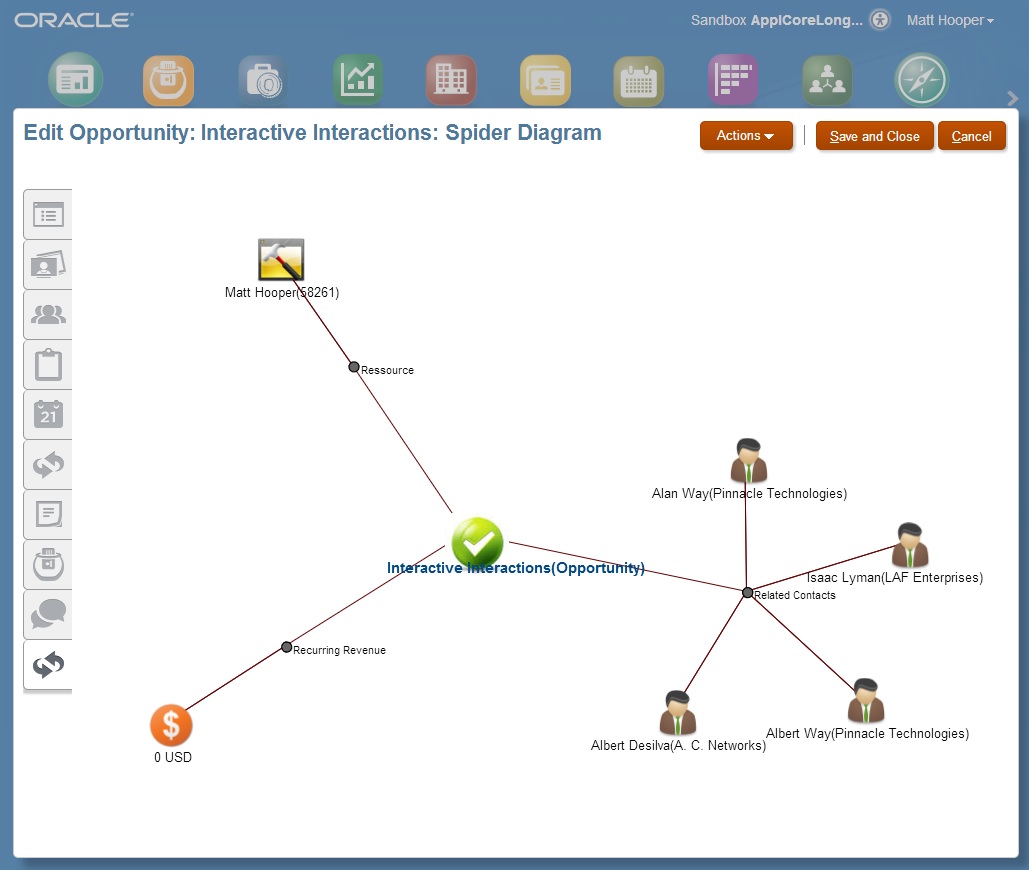
Thanks to Jan Peterson for this article Oracle Sales Cloud  has made some significant progress in the past 18 months and has become a very compelling offering. Alex has posted a summary of the R8 release a while ago . Simplified UI is - in my humbled opinion - the biggest improvement of recent releases. It has been introduced with R7 and significantly improved as part of R8.  As part of the R8 release, the configuration capabilities have been significantly enhanced. As I had a bit of time, I decided to test if more complex Open UI configuration examples can be migrated to Simplified UI. The short answer - at least for the example I picked - is "yes". I have recently  posted an article about arbor, a jQuery plug-in that allows to display complex relationship hierarchies. In the Open UI example we used it to display relationships of a contact. For Simplified UI, I picked opportunities as an example. Below a screenshot of the final outcome that shows a opportunity and its ...

Siebel Mobile Applications: Create Activities for Outbound Phone Calls

תמונה
The following is a guest post by Sandra Wamsley, Programmer Analyst at Laerdal Medical . In her article she describes how to use a custom Physical Renderer in Siebel Mobile Applications to capture the event when the user taps the phone icon to make a call as an activity record in the Siebel database. The code samples and manifest configuration described are for Siebel 8.1.1.10 / 8.2.2.3. *** When we first began developing our Mobile application, an early request came in for the application to automatically create an Activity when an outbound phone call was made through it.  This was accomplished by having a physical renderer call a business service from within Siebel, which would create the activity. We had to accomplish this on two different business components - Accounts and Contacts - using two different fields. The physical renderer had to accomplish three things: It had to see that the phone icon had been pressed in the application, get the Id of the Contact or Account that th...

Siebel Mobile Applications: Create Activities for Outbound Phone Calls

תמונה
The following is a guest post by Sandra Wamsley, Programmer Analyst at Laerdal Medical . In her article she describes how to use a custom Physical Renderer in Siebel Mobile Applications to capture the event when the user taps the phone icon to make a call as an activity record in the Siebel database. The code samples and manifest configuration described are for Siebel 8.1.1.10 / 8.2.2.3. *** When we first began developing our Mobile application, an early request came in for the application to automatically create an Activity when an outbound phone call was made through it.  This was accomplished by having a physical renderer call a business service from within Siebel, which would create the activity. We had to accomplish this on two different business components - Accounts and Contacts - using two different fields. The physical renderer had to accomplish three things: It had to see that the phone icon had been pressed in the application, get the Id of the Contact or Account that th...

Siebel Open UI: Collapsible Applets - Another Revisit

תמונה
By Jan Peterson During a presentation to the technical team of a customer who is in the progress of updating to Open UI, I showed how easy it is to make all applets collapsible by just adding some code to a postload event handler. We have looked at the general concepts in an earlier post : postload.js I quickly received a follow up question if it is possible to collapse applets automatically in case the applet doesn't have any records. As often in the new world of Open UI, the solution is very easy. Replacing oAppletPModel.SetProperty("defaultAppletDisplayMode", collapsed"); with oAppletPModel.SetProperty("defaultAppletDisplayMode", oAppletPModel.Get("GetNumRows") > 0) ? "expanded" : "collapsed"); does the job :-). A few notes: In the example I updated postload.js. For a production environment it is recommended to have a custom file that subscribes to the postload event ..   The postload event is only triggered if a user nav...

Siebel Open UI: View PRs - a Toolbar to quickly access Applets

תמונה
by Jan Peterson In a previous post we already looked at physical renderers for views . Today we look at an example that was in a similar form part of the first pre-beta demos of Open UI (yes - the version that was shown during OOW 2011 :-) ) - a toolbar of buttons where each button represents an applet. In our example, clicking the button will collapse all other applets (which is slightly different to the OOW 2011 demo where the corresponding applet was floating to the top): Click to enlarge The code structure of the PM is essentially the same as in the previous example: Click to enlarge Most of the logic resides in SetRenderer : Click to enlarge First, we create two buttons - one for collapsing all applets and one for expanding all applets. Afterwards, we iterate through all applets and make sure that they are collapsible - a trick we looked at in a previous post . Afterwards we create a button for each applet. The button-text is the label of the applet. As a small gimmick we add the ...

Siebel Open UI: View PRs - Sort 'em out

תמונה
Thanks to Jan again for this guest article *** In prior releases of Open UI most configurations were limited to a single applet. Presentation Models (PMs) and Physical Renderers (PRs) could be reused for different applets but - apart from CSS changes - there was no documented way to provide changes outside of applets or enable configuration that spawned more than a single applet. Most of the time such changes ended up in the (undocumented) postload.js. A feature that didn't make it into the first release of IP2013 but ended up in the first patchset are PMs and PRs for views  (I am pretty sure that I saw this documented in the release notes of patchset 1 - unfortunately I am unable to find the note - please drop me a note with the link if you have the URL at hand). In case you are unfamiliar with the new concepts of patchsets have a look at Latest recommended maintenance pack for Siebel Open UI on Siebel Version 8.1.1.x and Version 8.2.2.x [Document 1535281.1]   which sta...

Siebel Open UI: Collapsible Applets Revisited

תמונה
by fellow author Jan: In a previous post we looked at how applets can be made collapsible by using the Default Applet Display Mode applet user property in Siebel Tools. In the following we look how we can use the same feature in a custom physical renderer (PR) without the need to change the repository (or SRF). How  ClientPMUserProp works Let's investigate what happens when we add a value to the ClientPMUserProp applet user property: First, Siebel passes all values that are in the list of the values of ClientPMUserProp to the client. Next, the values are encapsulated in a property set of type apm which is read in the the  Setup  method of the Open UI proxy file pmodel.js and put into properties of the PM. As we can see the value of the user property Default Applet Display Mode is stored in the PM property defaultAppletDisplayMode. Click to enlarge The PM property defaultAppletDisplayMode is read in the method ShowCollapseExpand of the Open UI proxy file phyrenderer....