רשומות

מוצגים פוסטים עם התווית Case Studies

Generating Data to UI mappings in Siebel just got easier!

תמונה
This is one of those tasks which is fairly simple to do. However, can be very time consuming considering you have to generate a mapping for an entire/multiple repositories. We've all have had to do this at some point, not enjoying it one bit! Well, here is a code that will save you some time and your sanity :) . The below code generates a screen to Applet, and an Applet to BC mapping which can be then exported to excel. Screen to Applet -  select scr.name "Screen Name"       ,nvl(nvl(ptabi.tab_text, scri.viewbar_text), scr.viewbar_text) "Screen"       ,scrv.sequence "View Seq"       ,vw.name "View Name"       ,vwi.title "View"       ,vw.busobj_name "Business Object"       ,vwti.item_num "Item Num"       ,ap.name "Applet Name"       ,api.title "Applet"       ,ap...

Skype - Siebel Custom Integration

תמונה
Want to call one of your contacts/prospects in Siebel without a lot of manual effort? now you can... Here are a few simple steps of how you could integrate Skype with your siebel application. Thank you Bernard for sharing this ! Configuration Steps - (for this example I am going to use the contacts applet) Step 1: Create a custom Business service called 'OS Skype Integration' and assign it to a locked project. place the below code in the PreCanInvokeMethod event of the Business Service function Service_PreCanInvokeMethod (MethodName, &CanInvoke) {     if(MethodName == "GetField")     {         CanInvoke="TRUE";         return(CancelOperation);     }     else if(MethodName == "TransformToSkype")     {         CanInvoke="TRUE";         return(CancelOperation);     }  ...

Launching iHelp with eScript

Hey Folks, I had a requirement with one of my clients to have a button on a Form Applet that opens the iHelp . "My Oracle Support" has a few SR's that are related, and I had tried various things including trapping the method calls that are triggered when clicking on the iHelp button on the Toolbar, then repeating them on my custom button but with no luck. Oracle support seems to confirm you can't Launch iHelp with Script in Siebel 7.7, but doesn't mention Siebel 8.1 (which probably means you can't do it!) This however is possible through script. You could use the below code on the button to toggle the iHelp from a custom button. Code: function WebApplet_PreInvokeMethod (MethodName) {     if(MethodName == "LaunchiHelp")     {         var oBS = TheApplication().GetService("Task Assistant UI Service");         var psInputs = TheApplication().NewPropertySet();       ...

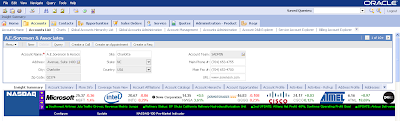
Get NASDAQ Market updates in Siebel

תמונה
Like most of you Siebel lovers I too like to integrate anything and everything with Siebel. Here is an example of how you can get NASDAQ updates within your Siebel Application. Here is how you do it! Steps: 1. Create an applet with a Single control. 2. Add the following code to your single control that you have in your applet. Caption String Override: (in frame src tags) ="tickerpanel.asp?COOKIE=S~MSFT~~|S~INTC~~|S~NWSA~~|S~QQQQ~~|S~CSCO~~| S~ATML~~|S~DELL~~|S~NVDA~~|S~RIMM~~|S~MU~~|I~IXIC|I~INDU|I~SPX" name="ticker" scrolling="no" frameborder=0 noresize marginwidth="0" marginheight="0" 3. place this applet in a view and your done! Stay tuned for a more advanced version of this post! Cheers!

Create an HTML email in Oracle CRM On Demand

תמונה
12" name="Generator"> Hey Folks, For any business, It's very important to keep your customers happy at all times.You need to constantly keep them updated on how their service requests are being processes. Below is one such example I recently came across a requirement in which my client wanted to have some functionality in which, when a new SR is created, a Service Representative should be able to generate a neatly formatted email with all the required information and send it across to a Customer, so they know that the SR is being looked into, something like a SR Acknowledgment. Here's what I did for them! Solution: Step 1: Build the Report Create a Narrative Report that will contain all the required fields that is required to send out an email. In Step 2 on the reports wizard add only a Narrative View Save the report Step 2: Create a Weblink and add to the Layout Create a Weblink field in the Service Request Object. Ed...