רשומות

מוצגים פוסטים עם התווית Configuration

Authentication Business Service

Most people want security in this world. So whatever piece you design, Authentication becomes the key aspect. There are times when you want to authenticate whether the user-in-context is valid siebel user or not without actually logging into the system. This type of requirement is typical in Mobile Solutions using HTML5 and siebel webservices. Here I unearth one more hidden gem of siebel, " Authentication Business Service ". This magical service authenticates user against siebel irrespective of your security authentication mechanism. Be it database or LDAP it will return you valid siebel user name else invalid user/password error.The method is " Authenticate ".  It accepts three input parameters: 1 - User Name - User Name to be authenticated in siebel 2 - Password - Password of the user 3 - GetPrivateCredentials - Y OR N based on the requirement.  If set to Y it will result user name in "Siebel User Name" output parameter. One can see its usage in " L...


Multiple File Attachments

תמונה
Necessity is mother of taking chances. In recent outrage by our business users, we were asked to provide option of selecting multiple file attachments. Unfortunately siebel doesn't provide option of creating multiple attachment in one go. Even drag and drop in High interactivity creates only one attachment. With Open UI there are options but with good old HI and SI mode this can be real tricky. However, With mix of HTML-Javascript-browserscript we were able to achieve a custom built html file with multiple file browse options. where user could select three files in one go. Below custom file browse HTML was used . Name is as "MultiFileAttach.htm". File1 File2 File3 Once the HTML page is ready, copy it in  Siebel\Client\PUBLIC\Enu and \siebsrvr\WEBMASTER\enu folders. I was not able to use Multiple attribute for file input type (food for thought for Javascript masters) so was forced to use three different file controls. The key here is returnValue property which returns the...

How to display Popup applet in Siebel - Possible ways!!

Siebel provides various different OOB ways to display a Popup applet, no matter if it a list applet or form applet. Here below is the list of all possible ways: 1. ShowPopup This is a straight forward OOB way to display a popup applet which is mostly used to display a popup when button is clicked. a.

How to expose a hidden field in Siebel list applet?

This is a very simple requirement that I am talking about today, where on a button click you are required to do a GetFieldValue() of a active BC field, which is NOT exposed on the UI and doesn't have the Force Active property checked. If you try to do that, system prompts an error sayng: A script failed to get the value for field because the field was not active.(SBL-EXL-00119)

Siebel Mobile Connected Apps - Side effects of custom toggle applets.

We've been doing some development on the very new Siebel mobile connected apps . The Siebel Mobile app is a huge and exciting addition to Siebel CRM. However, Just like all new products, you can expect some product defects in the initial version of the software. We will be updating this blog with all the bugs we come accross and their workarounds untill we have a permanent solution from Oracle. Issue: Side effects of custom toggle applet in Siebel Mobile connected apps. Here is how you can reproduce the Issue - Create a toggle applet on a Form Applet to toggle on a particular LOV value. Lets say the LOV toggle Value is 'Retailer' Issue 1 - (New Record renders the applet in Base Mode) The applet opens in Base mode when the record context is the value (Retailer) used for the toggle in the list applet. However when you create a new record from other types record, this does not happen. Issue 2 - (Toggling back from the toggle applet, renders the applet in Base Mode) After you ...

Changing Font and Color

"Mere color, unspoiled by meaning, and unallied with definite form, can speak in thousand different ways." -- Oscar Wilde Status bar is a common feature in siebel where color encoding depicts the status of record. I recently encountered similar scenario where i had to display different coloured text based on certain conditions on Form Applet. Browser script clicked me first. But finally this was achieved using configuration. As i struggle to achieve similar result in List applet we will discuss how on Form applet desired could be done. Lets take Service Request entity as an example (offlately this is becoming my favourite entity). Problem Statement : If SR has some related SR then it should display some text in Red else alternate text in green. Solution: a) Go to SR buscomp. Create following fields Name: PastSRRed Calculated: True Calculated Value: " < font color='red' > "+"This SR has related SR." + " < font > " Name: PastSR...

Illusion in Standard Interactivity

תמונה
Whenever I am asked to work on siebel standard interactivity it feels like harry potter stranded in those wild mazes. But i can tell you if you play in Java/HTML you can really unearth hidden gems in SI application. Recenty while working on Siebel eSales portal we were asked to implement  typical requirement to control button's visibility conditionally.  For the Open status button should be visible on list applet and for other status values it should be hidden. Once again "WebApplet_ShowControl" server event is  critical to its implementation as other browser events of applet are not supported in SI architecture. The idea is to modify the HTML generated at run time to  achieve conditional visibility. Below steps are required for ultimate illusion. 1 - In the HTML attribute of the Button Control which we want to make conditionally visible add below property style='visibility:hidden' By default button will be hidden and we will only make it visible when ...

Generate Quote using Narrative Reports in CRM On Demand

תמונה
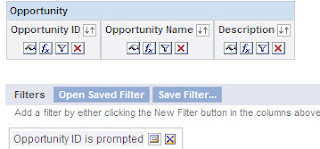
Hey Guys, One thing we all think about is how to design a simple solution to a complicated requirement and so today lets see how to create a Narrative report for a 1:M relation. As you may know Narrative Report can be used only on one record. But, using a combination of reports, we can do the a LOT more! All we need to do is create 2 reports linked to each other and add them to a Dashboard. let me show you how. Step 1: Create a Opportunity Parent Report Using Opportunities Subject Area (Reporting  or Real-Time) Add the fields you would like to use on the Opportunity Information Section of the Quote report. In Step 2: Create Layout , Add a Narrative View and use the this code Opportunity Parent Narrative View Code . Make sure you use the @"Number" symbol in the right places, or the values would display against the wrong columns. You'll notice that the values are not correct in this preview, don't worry. since this report is not being filtered from the Prompt yet, the...

Thread Bar Updation

Sometimes Simplicity just does not precede complexity, but follows it. Recently while configuring Thread Bar for some views, we faced a trivial issue. Value of the Thread Field defined was not coming in the Thread bar.  We have specified the correct Thread Applet, Thread Field and Thread Title properties for the related views but only Thread Title was being displayed when we drilldown from List view to Form View. Google resulted this issue being faced by other users without fix. Things got luckier for me when i found a similar article on support web which stated that this is the intended behavior of siebel when the underlying Business Objects of traversing views are same. However as workaround of this issue there are three options: Have different BO's for List View and Destination View. Remove thread bar and make use of IE back option. If it is business critical to have navigation path in thread bar then one can define Source Field and Destination...

Reload Profile Attributes

There are times one has to wear multiple hats as part of job, definitely a mandate if you are married. Sometimes a Manager has to work as team lead or vice versa. Typically such scenarios are easily handled in siebel using "Change Position" concept. However trouble starts when you have used persistent profile attributes in the search scenarios which fails when user opts for changing position specially if search is based on profile attributes like Job Title, Position Type. Recently we faced similar scenarios as one of the user had two roles. We used "Division Name" profile attribute to display list of employees while picking SR owner. Trouble started when user did change position and for the other position intended list of employee was not coming. Division Name profile attribute is available in personalization profile BC using join and loaded in session when user logged in. The issue is profile attributes doesn't refresh when you do change position. Even a c...

RTCEmbedded Control

"When the solution is simple, God is answering"- Albert Einstein Recently we were asked to implement a embedded text editor in a control which could facilitate user for text formatting including features such as bold, italic,font, color etc.  The first reaction was can-we-do-it types with nothing popping in mind (Yeah, thought of Email Templates view never occurred ).But with some help of support web solution turned out to be much much simpler. We can achieve this by using control of type "RTCEmbedded". This control type provides an embedded text editor which supports below html tag: Bold < STRONG> italic <EM> Underline <U> Ordered list <OL> List items <LI> <P> <FONT> <BLOCKQUOTE > However there are certain caveats while using this type: 1 - Control doesn't turn out grey in case of read only conditions. 2 - Throws an error when reaching field length and clears out everything forcing user to renter everything. 3 - I...

Disabling button in SI Mode

Working with SI applications can be as good as playing with fire. Recently we faced an issue when some naughty users clicked button multiple times resulting in underline action getting executed multiple times. As in case of SI applications, if the method is taking time to execute then button is not disabled it remains active giving end user an impression of nothing-is-happening. So user may end up clicking the button multiple times. The only way to prevent multiple clicks is to disable button as soon as it is clicked. Fortunately there is an article on support which provides solution to achieve the desired but a scripted one. Following piece of code can be used to disable button after click. function WebApplet_ShowControl (ControlName, Property, Mode, &HTML) {     if(ControlName == "SubmitButton")     {       if(Property == "FormattedHtml")       {           var index = HTML.indexOf("onclick...

Cosmetic UI Changes

Cosmetics may be a weapon of women but it is always better to look over rather than over looked. Siebel OOB comes with a soothing look and feel but still it may not fit into coloring schemes. In this post we will discuss about some basic UI modifications. Statutory Warning: Please take backup of existing files before you play around. 1 - Changing Oracle logo This is the foremost change which should be done. lookout for the " CCFrameBanner.swt " template file and modify below code to suit your requirement. <td align="right"><a href="http://www.oracle.com" target="_blank" ><swe:image name="POWERED_BY" category="HTML Control Icons"/></a></td> Change this code to below code <td align="right"><a href="http://YOURURL.com" TARGET="_blank"><img src = "images/YOURIMAGE.jpg" height ="30"></a></td> 2 - Changing login screen In or...

Serialization - Sequence Generation

תמונה
Christmas has arrived a week early for us. Generating records in numeric sequence numbers can be a burning requirement in any application but not when you are working with siebel. Just when holidays were approaching and party mood was about take helm, we were asked to generate the payment requests associated with service request in sequence numbers (as third party system required that..no choice had to do it) . The first thought that struck was the usage of * Line Number (Sequence) BC based on the class CSSSequence. However the issue was for each Parent SR first payment notice starts from 1 as payment being child entity and the requirement was that sequence should start from 1000 and should be auto generated for every new record irrespective of Parent SR. Fear of ending new year eve in office can do wonders and suddenly we found that this requirement could be fulfilled using "Serialization" instead of writing a script. This technique is extensively used for gene...

Hiding Custom Controls in Query Mode

"Yesterday it worked, Oops Today it is not working..." This has to be my favourite line since i started my career. I was hit by the same nuke again by my team mate where we had to hide custom controls from the users in Query Mode. Some code was written to control the visibility of the custom buttons but it was failing in some conditions. It is easy to control the above scenario when we have different applets for Edit and Query Mode. We can remove the custom button from the Query Applet and keep only on the Edit applet. However, things are little different in case we are using Edit List Mode. A custom code is viable solution but it is not full proof as there are chances that it may fail. However Siebel comes again to our ally. For lucky developers who are working on SIA tools, there is a user property by which one can hide methods in Query Mode.  Name: FINS Query Mode Disabled Method n Value: Method Name   The only catch here is the applet class should be "C...

Query within date range

Date range is one of the very common requirements across project. It eases out lot of tasks for end user, one can easily generate report or export data items within given date range. Recently we were asked to implement similar functionality by inputting From and To date from the end user and resulting in all Service Requests between the given date range. There could be multiple solutions to go about it but one potential one is detailed below. 1 - Create Two calculated fields in SR BC.FromDate and ToDate of type "DTYPE_DATE". Set the calculated value to "Today()". 2 - Expose these two fields in the Query mode of the Applet. In the Edit Mode hide these controls. 3 - Below piece of code is required for setting up the Search expression and clearing the specs on To Date and From Date. var sFromDate = this.GetSearchSpec("FromDate"); var sToDate = this.GetSearchSpec("ToDate"); if(sFromDate != "" && sToDate != "") {  var sFrSu...

Read Only Field N: Applet Version

Implementing C.R.U.D. can be cruel... Read only syndrome was bugging me for quite a while as we had a requirement of making multiple columns to be readonly on certain applets depending on multiple conditions. First thought that burst into mind was using dynamic toggles but conditions were complex and number of applets to address was huge. The worst part was underneath field should remain editable for update by interface workflows. Once again situation demanded to dive into mysterious siebel to have a simpler solution and boy, siebel seldom disappoints. I was able to achieve this by using Applet Level user property "Read Only Field N". This user property allows to make field read only on UI, by allowing field updates from workflow or scripting. The syntax goes like Name: Read Only Field 1 Value: 'FieldName', 'ConditionFieldName' where FieldName = Name of the field which we want to be readonly ConditionFieldName = Name of the field which specifies condition to b...

Different Query Mode in Edit List

I crunched one. This post is an addendum to one of my previous "Food for Thought" post where the main challenge was to display different columns in Query Mode when applet is displayed in Edit List Mode. with some configuration-Scripting-Luck i am able to achieve this scenario. The key ingredient here is the usage of Dynamic Toggle. Following necessary steps are required to achieve desired solution. 1 - Create a clone of the list applet which should be displayed in Query Mode. Remove unnecessary Columns which are not required to be displayed while querying. Consider two applets are: a) SR List Applet b) SR Query List Applet 2 - Make the "SR Query List Applet" as the default applet to be displayed in the view. 3 - Create a calculated field in the Service Request BC with following values: Name: QueryCalc Value: IIF(GetProfileAttr('QueryMe') = 'Y','Y','N') 4 - Now create a dynamic toggle in the "SR Query List Applet". Set the ...

Child Field Read Only depending on Parent Field Value

Sometimes it happens that you get a very simple requirement to implement and in a single glance you say, "Well, this is very easy to implement" and when you actually see the result on the UI after the configuration you have done, you start scratching your head to find out the reason for not getting the result as per the expectation.Today, I am going to discuss a very simple requirement you might

Popup visibility - Division Based

It is very critical that one should have appropriate access to information available. Thus siebel has given comprehensive access control mechanism which helps in restricting data visibility. We can have visibility filter at multiple levels including View, Business Component, Picklists, Drilldowns, Links . However the modes which we can set is restricted to following values: All Personal Sales Rep Manager Organization Sub Organization Group Catalog Recently i was asked to have a visibility control based on the Division during the assignment of Service Request. One should see employees related to his division only when he opens employee pick applet. We opted for Personalization to implement this as it gives a flexibility to change the filter dynamically without any srf change. Steps required are: 1 - Set the Popup Visibility Type to "All" for employee buscomp. (Please check before doing this as this will impact all Picklists based on Employee BC) 2 - Create a Personalization ...