רשומות

מוצגים פוסטים עם התווית Scripting

April Repost: Requirements Analysis
תמונה
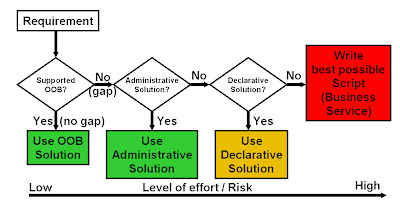
Time for our monthly blast from the past. Below is a five year old article which I believe is timeless, especially in times of Siebel Open UI (scripting). Please enjoy... (Note: Links have been slightly updated) *** This is a follow-up post (and the first in a semi-series) on the scriptless Siebel challenge . Question : Why is so much script code written in Siebel projects? Possible answers (not a complete list, add your own...): Developers are used to write code (we have been coding since Siebel 99, haven't we?). Workflow, Business Rules, etc are nice but they are difficult to learn/manage and we don't have time to evaluate solutions. Architects and developers don't know that alternatives exist. As we all agree, the best time to avoid writing custom code in standard enterprise applications is design time. So it's the responsibility of the business analyst or technical architect to design a code-free solution for a given requirement. Back in the Siebel days (and also t...

How to display Popup applet in Siebel - Possible ways!!

Siebel provides various different OOB ways to display a Popup applet, no matter if it a list applet or form applet. Here below is the list of all possible ways: 1. ShowPopup This is a straight forward OOB way to display a popup applet which is mostly used to display a popup when button is clicked. a.

How to get the Date difference in Days, Hours, Minutes, Seconds

A one liner solution for requirement to find out the date difference between two different dates in eScript: function Service_PreInvokeMethod (MethodName, Inputs, Outputs) { var Date1 = new Date("12/22/2012"); var Date2 = new Date("12/23/2012"); TheApplication().RaiseErrorText( "Date1 =" + Date1 + "\n Date2 = " + Date2 + "\n Date Difference in Days = " + (Date2.getTime() - Date1

The Lost Functions

"Wide acceptance of an idea is not proof of its validity" - Unknown Despite No-to-script being the motto of every project its usage is inevitable. Sometimes a two line code is easy to implement rather complex configuration. There are lots of methods and events exposed by siebel for developer's ease. In fix-run situations it is tough to remember all the methods/events available. Bookshelf definitely possess the entire wealth but here i will post a cheat sheet which has juiced up all the methods and events exposed by the siebel except special ones. Siebel eScript cheat Sheet This sheet can help someone to decide for which event to go who rarely use scripting or can help to better prepare for an interview. Happy Scripting!! PS: If you are not able to d/l this file let me know preferrable email id. you will have personalized copy of this.

Different Query Mode in Edit List

I crunched one. This post is an addendum to one of my previous "Food for Thought" post where the main challenge was to display different columns in Query Mode when applet is displayed in Edit List Mode. with some configuration-Scripting-Luck i am able to achieve this scenario. The key ingredient here is the usage of Dynamic Toggle. Following necessary steps are required to achieve desired solution. 1 - Create a clone of the list applet which should be displayed in Query Mode. Remove unnecessary Columns which are not required to be displayed while querying. Consider two applets are: a) SR List Applet b) SR Query List Applet 2 - Make the "SR Query List Applet" as the default applet to be displayed in the view. 3 - Create a calculated field in the Service Request BC with following values: Name: QueryCalc Value: IIF(GetProfileAttr('QueryMe') = 'Y','Y','N') 4 - Now create a dynamic toggle in the "SR Query List Applet". Set the ...

How to Integrate Google maps with Siebel for multiple addresses

תמונה
A few days back a client asked me if we could have Google maps integrated with their Siebel application, that would enable their reps to locate their contacts/accounts on Google maps, and find the best way to reach them based on their mode of commute. Initially, they had planned to do this for single addresses. However, I tried to convince them to go for multiple address selection. The key business driver here in my opinion would be that, the user can optimize his/her travel route based on the proximity of his/her reps, thus saving time and money. Google maps also offers a few more features like checking for traffic, avoiding tolls, taking highways etc. Google maps is really cool, and integrating it with Siebel makes it cooler ;) Really!! show me how? Step 1: The first step would be to get the Google map applet setup on your Siebel application. There are many ways to do this. For this example lets go with Mash-up your CRM with Google maps in < 30 minutes . Step 2: On...

Use GetAssocBusComp () with caution!!

Sometimes we write script and never realize it might result in error due to record set on which it is getting operated and it becomes issue in live environment. Similar kind of scenario I observed while using "GetAssocBusComp()". Siebel geeks who have used this method before must be aware that this is being used to get the Association business component and it's "Associate" method is being used

How to send Email in HTML Format?...... contd

In continuation of the previous post, I found another good way to achieve the requirement of sending email in HTML format and moreover you are required to replace the field values dynamically from business component. So the extra information you need to provide to Outbound Communication Manager is the ROW_ID of the record in context.Suppose, here below is the Email Template need to send in HTML

How to send Email in HTML Format?

If you get a requirement to send an email from Siebel, the very simple way is to make use of OOB business service, i.e "Outbound Communications Manager" with the method "SendMessage". Following input parameters would be enough for this purpose: a) MsgToList b) MsgSubject c) MsgBody d) CommProfile Here below is the working example for the same: var inp = TheApplication().NewPropertySet();

Multiple Email Validation Script in Siebel

This post is a result of my sheer frustration for not getting this right in a 100 tries. I had been trying to validate the email addresses being entered in Siebel. I tried a lot of ways to get it to work (Data Validation Manager, Runtime events, Configuration etc) but the darn thing would just not work. I had to ultimately resort to the "boo hoo"- Script! I thought this would be useful for a lot of Siebel guys out there, will save you from all that frustration.(Checks/validates for a comma separated list of emails as well) Code: function BusComp_PreWriteRecord () {     try     {         this.ActivateField("Email Address");         if (this.GetFieldValue("Email Address") != "")         {             var sEmail = this.GetFieldValue("Email Address");             var sPattern = /((\w+...

Prompt:Browser Script::LoadPopupApplet:Server Script

תמונה
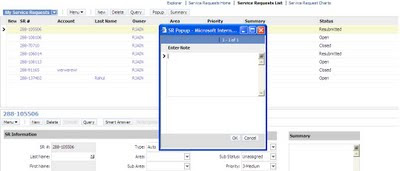
Whether we can repeat browser side capabilities via server side, like Alert/Prompt, always charms any developer. Server side "Alert" is beautifully explained on the siebel Impossible scriptless challenge using "LS SubjectVisits Service" business service with "ShowConfirmationDlg" method. Recently i was asked to implement Prompt sort of functionality using server side code. After some hits and lots of misses i came up with not so beautiful solution but it worked. Lets consider a scenario where on click of "Summary" button, code should check the status of Service Request if it is "open" then it should prompt user to enter notes and capture these notes and put it in the Summay of service request. The solution is blend of List of Value BC and pop up applet. I found a business service "SLM Save List Service"(thanks to Google again...wonder what life would have been w/o Google...) which could be used to invoke a popup applet from s...

Fetching IP Address in Siebel

תמונה
Security is like superstition. Hits are always counted while misses doesn't. Recently i was asked to enhance security measure of our siebel ebusiness applications by tracking the IP address along with the login of the client. The first thought that came to mind was @#$@#$@# but then again why-to-fear-when-google-is-here happened. I found a lesser heard OOB business service which returns the session variables, cookies information and many more useful stuff. "Web Engine HTTP TXN” business service can do the trick for you. Details of this BS is avialable on the support web in "TECHNICAL NOTE 317". "GetAllServerVariables" and "GetServerVariables" are key methods here for fetching the Login and IP address respectively. I followed below steps in order to capture the IP address of the logged in user. 1 - Create a action set which calls a workflow. In this workflow we will have two steps: First step calls " Web Engine HTTP TXN " with method ...

Browser Scripting in Standard Interactivity

I have never been fan of SI applications because of the unpredicatble limitations it offers. But however recently one of my friend cum life saver,Vinay Jain aka Vivacious,asked me a trivia and i was forced to jump into the ocean. Browser scripting incapabilities in SI mode is wastly documented but it is not mentioned how a well written server side code can compensate for the browser scripting.The reason that the browser script code doesn't run in standard interactivity client is because of unavailability of Siebel objects and methods.However Siebel is generous enough to provide some DOM events which could be effectively used to carry out desired task. Sometimes it is necessary to fetch field values in the browser code or to click button that navigate user to different link. Lets try to explore these scenarios in this post. Problem Statement: Need to open a url on click of button on SR detail applet which requires SR number to be appended as argument. Solution: The very first chall...

Skype - Siebel Custom Integration

תמונה
Want to call one of your contacts/prospects in Siebel without a lot of manual effort? now you can... Here are a few simple steps of how you could integrate Skype with your siebel application. Thank you Bernard for sharing this ! Configuration Steps - (for this example I am going to use the contacts applet) Step 1: Create a custom Business service called 'OS Skype Integration' and assign it to a locked project. place the below code in the PreCanInvokeMethod event of the Business Service function Service_PreCanInvokeMethod (MethodName, &CanInvoke) {     if(MethodName == "GetField")     {         CanInvoke="TRUE";         return(CancelOperation);     }     else if(MethodName == "TransformToSkype")     {         CanInvoke="TRUE";         return(CancelOperation);     }  ...

Launching iHelp with eScript

Hey Folks, I had a requirement with one of my clients to have a button on a Form Applet that opens the iHelp . "My Oracle Support" has a few SR's that are related, and I had tried various things including trapping the method calls that are triggered when clicking on the iHelp button on the Toolbar, then repeating them on my custom button but with no luck. Oracle support seems to confirm you can't Launch iHelp with Script in Siebel 7.7, but doesn't mention Siebel 8.1 (which probably means you can't do it!) This however is possible through script. You could use the below code on the button to toggle the iHelp from a custom button. Code: function WebApplet_PreInvokeMethod (MethodName) {     if(MethodName == "LaunchiHelp")     {         var oBS = TheApplication().GetService("Task Assistant UI Service");         var psInputs = TheApplication().NewPropertySet();       ...

Auto-Refresh/Auto-Save

תמונה
I am pretty sure most of us here are sports buff. Me being an ardent cricket lover used to spend 4-5 hours on cricinfo. Life is really cool when the scoreboard says the latest score automatically in every 2 minutes. It would have been real killing if someone had to manually click on refresh button to get the latest updates or for money matters latest update on stocks every n minute. One of my friend recently experienced same problem while dealing with service requests. The scenario was to have auto refresh of the SR list applet pool in every 2 minutes so that users can pick request to work on, as requests were coming from some other portal. Once again support web was our alley. A little bit of browser script and deal was done. Following steps were taken to achieve this: 1 - Query applet for which auto-refresh is required. Open Browser Script editor. Jump on the Applet_Load event and put below script: function Applet_Load () { //To Invoke AutoRefresh function in every 2 minutes s...