רשומות

מוצגים פוסטים עם התווית Tips

How to time trigger workflows through command prompt

If you have workflows in your CRM system that are required to be run everyday, but for some reason you are running them manually, this might be a good solution for you to save some time. This solution demonstrates how you can trigger your Siebel workflows at specific intervals of time on windows. For, Siebel environments on other operating systems, you will have to create a solution similar to this, the only difference being the batch file will have to be written in shell (for Linux/Unix) or the programming language that is supported by the OS. Step 1 - Write the batch file Copy the below code in a text file and save it with the .bat extension ::Set Localization   setlocal ::Gets The Parameters and sets into Environment Variables    set GTYSRV=%1    set ENTSRV=%2    set SIEBSRV=%3    set SIEBUSR=%4    set SIEBPWD=%5    chdir C:\sia81\siebsrvr\BIN       :: The workflow process name    set wf=T...

How to Optimize Siebel Application Login Time

תמונה
Recently, we've had a lot of users complaining about the homepage taking too long to load. Why does the login page take long to load? What happens when the login page loads. Below are some of the tasks that Siebel performs while loading the application. - Verifying Application Schema Version - Loading / validating State Models (checks whether or not the expiration date is greater than current date) - Verifying State Model values for transition - Loading / Validating Personalization rules and rule sets for each event on applets, Business Components, - - Business services and application - Loading / validating user profile data. - Loading / validating System preferences - Loading localized data (Phone format, date format, time zone, currency etc) - Loads user reporting hierarchy - Loads application view-responsibility data. - Message Broadcast (This can be inactivated by inactivating the Message broadcast bar) The reason behind such a behavior is that some of the static data (locali...

How to Create a Parent with Multi Child Tabs on Aggregate Views

תמונה
As the quote goes, "You cannot NOT have a user experience". User experience is one of the most important things in product design. I personally feel that Siebel's User Interface could be a lot better than what it is (but thanks to the new Innovation pack for 2012, with the Open UI I think Siebel is getting there). Most users do not like drilling down on a record which then takes them to the detail view of a record and then navigating back to the parent record. What they usually ask for is, if they could have the tabs right on the main view of the screen. Something like this -   Some thought this was not possible but actually it is and requires just a web template change for the Aggregate views. Change the Web Template of the view to either one of the following - 1. View Parent Multi Child With Tabs 2. View Parent List With Tabs Cheers!

Tips 'n Tricks for Oracle CRM On Demand

תמונה
An excellent free book providing tips and tricks fro improving your Oracle CRM On Demand application. - by Mathieu Emanuelli and Joann Alejandro Bravo Cheers!

Generating Data to UI mappings in Siebel just got easier!

תמונה
This is one of those tasks which is fairly simple to do. However, can be very time consuming considering you have to generate a mapping for an entire/multiple repositories. We've all have had to do this at some point, not enjoying it one bit! Well, here is a code that will save you some time and your sanity :) . The below code generates a screen to Applet, and an Applet to BC mapping which can be then exported to excel. Screen to Applet -  select scr.name "Screen Name"       ,nvl(nvl(ptabi.tab_text, scri.viewbar_text), scr.viewbar_text) "Screen"       ,scrv.sequence "View Seq"       ,vw.name "View Name"       ,vwi.title "View"       ,vw.busobj_name "Business Object"       ,vwti.item_num "Item Num"       ,ap.name "Applet Name"       ,api.title "Applet"       ,ap...

Siebel Power User - Part 1

תמונה
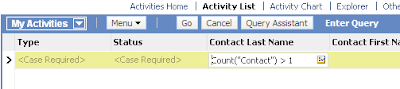
Hey Folks, Here is the first of the many Siebel power user series to come. Just recently discovered a few cool features in Siebel from an end user perspective. Many a times the user is required to update multiple records of data based on a condition, that the user would normally not know how to execute simultaneously. For instance, I recently had to update a few(not really) activities in Siebel under a condition where the activity had just one contact associated to it. How would an end user go about making this change? Lets discuss two such "Good to knows" in the following scenario The Requirement - Lets say you have to update the status of 100 or so activities which do not have more than one contact. The Trick - Go to the Activities applet, and use the below query on the Contacts field Count("Contact") > 1 Note: Contact is the MVL used in the Contact MVG This will give you all activities with more than one contact association. Now, lets update the Type of the A...

Setting a Default Template in an Applet To Be Used With Send Email (F9)

תמונה
Hey Guys, Its been a while since my last post, apologies for the same. I have been trying to do too many things at the same time :P While doing some extensive research on Siebel's f9 send email functionality, I came across this cool feature. So if your business uses a common template to send out to its contacts from a specific applet, this feature could prove useful to you - saves you the effort of manually selecting the template. Here is how you can add a Default Email Template to your applet. Step 1: Query for the desired applet you want to set up the email template for. Step 2: Goto View > Windows > Properties Window. NOTE: If you are using Siebel versions prior to 8.x. You do not have to open the applet properties window. You should see it as part of the properties for the applet in OBLE. Step 3: In the Mail Template property enter the Email template name exactly the way it appears in the Siebel Client. Step 4: Compile and test - Now when you are on the just mod...

Create an HTML email in Oracle CRM On Demand

תמונה
12" name="Generator"> Hey Folks, For any business, It's very important to keep your customers happy at all times.You need to constantly keep them updated on how their service requests are being processes. Below is one such example I recently came across a requirement in which my client wanted to have some functionality in which, when a new SR is created, a Service Representative should be able to generate a neatly formatted email with all the required information and send it across to a Customer, so they know that the SR is being looked into, something like a SR Acknowledgment. Here's what I did for them! Solution: Step 1: Build the Report Create a Narrative Report that will contain all the required fields that is required to send out an email. In Step 2 on the reports wizard add only a Narrative View Save the report Step 2: Create a Weblink and add to the Layout Create a Weblink field in the Service Request Object. Ed...

Oracle CRM On Demand and Google Talk

תמונה
Word 12" name="Originator"> Hey Guys, If you are a Google Talk user, you may be aware that there is a link that allows you to sign into your Google account and chat with your contacts without the GTalk setup installation. We are about to use this cool feature in Oracle CRM On Demand to help Service Reps to chat with customers to resolve their queries. This feature may also be available for other messengers (yahoo, rediffmail, windows live), but let’s talk about Google for now.     Step 1:   Navigate to Admin---Application Customization---Global Web Applets.  Create a New Web applet and Fill in the below. You may also choose to have this on the Homepage according to your requirement. URL: http://talkgadget.google.com/talkgadget/popout ? Step 2:  Add the Custom Web Applet to your Action bar for the ‘My Setup---Personal Layout---Action Bar Layout’ Global link. ...

How to Stop a BusComp_PreWriteRecord

Many a times we find ourselves in a situation wherein we think our configuration is correct, but why the hell can I not see my changes. Tiny things make a big difference in Siebel and we spend hours trying to figure out whats going wrong, and more often than not its just a silly property that we may have overlooked :)...read on When the current record of a BC has beeen modified, the user cannot step off the record without either saving or undoing the record. (Under normal circumstances, saving is done automatically when stepping off, so the user does not need to save the record manually.) When calling RaiseErrorTest in BusComp_PreWriteRecord, or when returning CancelOperation from this event, the current record does not get saved to the database; however, it remains modified, and thus the user cannot step off the record. For the user, after clicking away the custom RaiseErrorText message, it may appear as if the system suddenly gets unresponsive as they cannot step forth and ba...