רשומות

מוצגים פוסטים עם התווית Oracle CRM On Demand

Generate Quote using Narrative Reports in CRM On Demand
תמונה
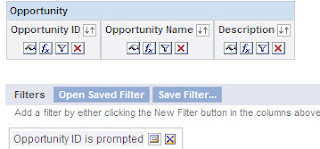
Hey Guys, One thing we all think about is how to design a simple solution to a complicated requirement and so today lets see how to create a Narrative report for a 1:M relation. As you may know Narrative Report can be used only on one record. But, using a combination of reports, we can do the a LOT more! All we need to do is create 2 reports linked to each other and add them to a Dashboard. let me show you how. Step 1: Create a Opportunity Parent Report Using Opportunities Subject Area (Reporting  or Real-Time) Add the fields you would like to use on the Opportunity Information Section of the Quote report. In Step 2: Create Layout , Add a Narrative View and use the this code Opportunity Parent Narrative View Code . Make sure you use the @"Number" symbol in the right places, or the values would display against the wrong columns. You'll notice that the values are not correct in this preview, don't worry. since this report is not being filtered from the Prompt yet, the...

Tips 'n Tricks for Oracle CRM On Demand

תמונה
An excellent free book providing tips and tricks fro improving your Oracle CRM On Demand application. - by Mathieu Emanuelli and Joann Alejandro Bravo Cheers!

Create an HTML email in Oracle CRM On Demand

תמונה
12" name="Generator"> Hey Folks, For any business, It's very important to keep your customers happy at all times.You need to constantly keep them updated on how their service requests are being processes. Below is one such example I recently came across a requirement in which my client wanted to have some functionality in which, when a new SR is created, a Service Representative should be able to generate a neatly formatted email with all the required information and send it across to a Customer, so they know that the SR is being looked into, something like a SR Acknowledgment. Here's what I did for them! Solution: Step 1: Build the Report Create a Narrative Report that will contain all the required fields that is required to send out an email. In Step 2 on the reports wizard add only a Narrative View Save the report Step 2: Create a Weblink and add to the Layout Create a Weblink field in the Service Request Object. Ed...

Generate pdf report with Images in CRM On Demand

תמונה
Hi, I had a requirement where the client had to display their company Image on pdf when the report was downloaded, the Image I was referencing was on their Company Portal. unfortunately the pdf file wouldn't pick this image, it worked only for HTML downloads. Here is how you do it! You can get Images from websites into your pdf file, but this will include two extra clicks... Go to any report, click the “Printer Friendly” option, and select HTML.    An HTML webpage will be generated for that report, now in that web page in the Menu bar, go to File and select Print…   The below popup screen will be displayed, select “Adobe PDF” and click Print. After you click Print you will have to save the Report, the save as type is automatically set to PDF, enter the Name .    And your pdf is generated will the Company logo. Cheers!

Oracle CRM On Demand and Google Talk

תמונה
Word 12" name="Originator"> Hey Guys, If you are a Google Talk user, you may be aware that there is a link that allows you to sign into your Google account and chat with your contacts without the GTalk setup installation. We are about to use this cool feature in Oracle CRM On Demand to help Service Reps to chat with customers to resolve their queries. This feature may also be available for other messengers (yahoo, rediffmail, windows live), but let’s talk about Google for now.     Step 1:   Navigate to Admin---Application Customization---Global Web Applets.  Create a New Web applet and Fill in the below. You may also choose to have this on the Homepage according to your requirement. URL: http://talkgadget.google.com/talkgadget/popout ? Step 2:  Add the Custom Web Applet to your Action bar for the ‘My Setup---Personal Layout---Action Bar Layout’ Global link. ...

Narrative View in Oracle On Demand

תמונה
Here is a post about Narrative View's in Oracle On Demand. Thanks to my good friend and colleague Asmita for sharing this.     Narrative view allows report users to display multiple reports or virtually any HTML content. Narrative view is used to create letters, quotes, or invoices. Using Narrative view we can embed other reports, web pages, or any HTML document. Step 1: Select the appropriate Subject Area and add the columns/data you want to display in the report Step 2: Code a HTML file as per required format. To embed report columns in to HTML add ‘@’ followed by column number.   E.g. @1 – Society Name Note: Count Columns from left to right. Step 3: Add a Narrative view to your report by clicking the Add View button, moving to the advanced submenu, and selecting the Narrative option. Step 4:   -The Edit View: N...

Invoke an external executable from Oracle On Demand

תמונה
Hey Folks, I recently came across a requirement which needed the user to call a contact from within Siebel On Demand using Skype. Here is how you achieve this- Requirements:   You need to have Skype installed on your local machine for this to work. Configuration:    Create two Fields:  1. Skype Id (Field Type = Short Text)  2. Skype URL (Field Type = Web Link) Now, click the “ Edit Web Link ” to edit the properties. In the URL you need to specify the callto function and pass the Skype Id of the contact you want to call. See below screen print. Save the changes. Now Create a Contact with the Skype Id and save it, go to the Detail Page , notice that the Skype URL is auto populated since you are passing the parameters.     And you’re ready to make your first Skype call from Siebel On Demand. When you click this Web link for the first time, you will receive a popup Click the Check box if you always want to call Skype, otherwise you will have to...

Salary trends for Siebel, Salesforce and CRM On Demand

תמונה
Here is a graph that shows the Salary trends for Siebel, Salesforce and CRM On Demand. Looks good right ;) Cheers!