רשומות

מוצגים פוסטים עם התווית DVM

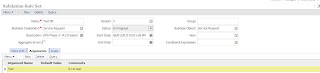
Arguments in DVM

תמונה
Amid world cup fever with MOB (Men in Blue) finding mojo, here is my small piece on Data Validation Manager with constant Alt-Tab as SRT is on way for number 47. One of the striking features of Data Validation Manager is the flexibility with which it allows to access fields in the underlying buscomp(Current Record) and child buscomp(All Records) in expressions. One can also pass arguments at run time to DVM which can be used in expression for evaluation. We need to define arguments in the "Arguments" tab for the rule set. This argument can be used in the expression just by appending the argument name with "&". Just like we use parameters in Data Map expressions. This arguments should be passed in the workflow invoking the DVM as Property Set. This allows us to pass multiple arguments to DVM at runtime which could be evaluated in the expression. With my productivity going less than 50% just wishing all memorable cricket world cup...

DVM on drilldown

Recently we encountered a scenario which involved certain validations on drilldown. The go to solution was to invoke DVM on drilldown method. Lets consider a basic example of SR list applet where we need to perform certain validations when user clicks on SR-Number. Following steps are required to achieve desirable. 1 - Create a DVM rule set with name "Test Orchestration". Add desired rules as per validation requirement. 2 - Create User Property on the SR business component with following values: Name: Named Method 1 Value:"SRDrill", "INVOKESVC", "Service Request", "Data Validation Manager", "Validate", "'Rule Set Name'", "'Test Orchestration'", "'Enable Log'", "'Y'", "'Object Id'", "[Id]" 3 - Navigate to SR list applet and edit server side script. Add following code in PreInvokeMethod event : if (MethodName == "Drilldown...

DVM - Length Restriction

Things can be real stinging when something works perfectly on your local and crashes on server. Recently i dated an error of database nature, which i always dread. "Error retrieving next record from the database (SBL-DBC-00104)" was constantly coming on server when we did query on our applet. It was working perfectly fine on my local machine. Server logs were not of much help as it constituted same error. Things are not always what we see.After some hunting i discovered that issue was because of "Text Length Override" user property which was recently added. We wanted to restrict user with certain character limit in description field but there were existing records in that table where count of characters was greater than the limit which we gave in the user property for Description. So eventually the option of using this user property was ruled out as this Table was common across mulitple BusComps. Once again DVM came to the rescue. We created rule set with expression...

Data Validation Manager - Count

Siebel always give multiple ways to achieve desired solution. Recently we got a requirement which could be accomplished using different methods. We approached solution using "Data Validation Manager". Problem Statement : User should not be able to Approve request if there is any activity associated in Open State. Soln : A little configuration and DVM rule was good enough to run business. a) Create a MVL in SR bc using with following Values Name: Open Activity Destination BC: Action Destination Link: Service Request/Action Type Field: Status Type Value: Open Compile BC. b) Navigate to Application - Data Validation. Create a new rule set based on the BO Service Request. Go to Rules Tab. Create a new rule with following values. Sequence: 1 Name: Open Check Expression: Count("Open Activity") = 0 Business Component: Service Request Apply To: Current Record Return Code: The key here is the name of the MVL."Count" function is directly used in the evaluation with ...