רשומות

מוצגים פוסטים עם התווית CSS Fix siebel open UI

Siebel Open UI - How to fix Form applet display issue in Chrome
תמונה
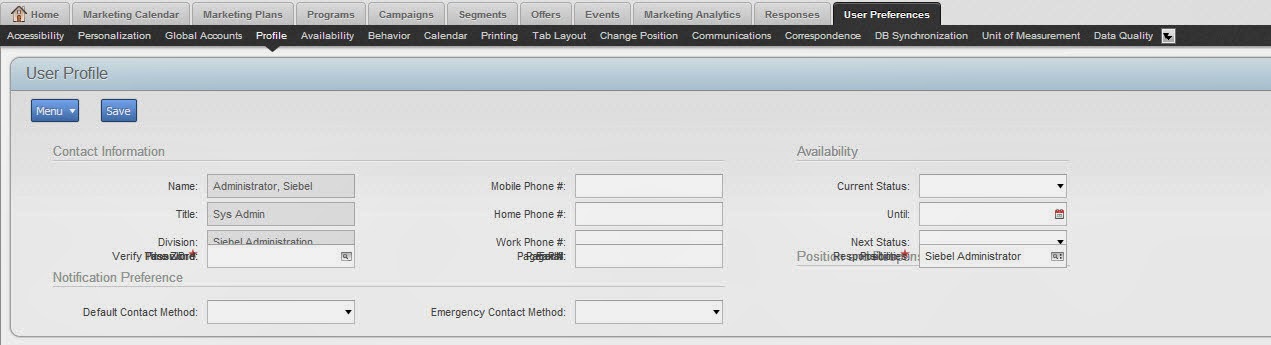
Open UI form applets have some issue, when it rendering in Google Chrome.The controls are overlapped as shown below. Solutions Fix without JS ------------- Open a CSS file your application referring paste the below css td {     border: 1px solid transparent; } clear the cache and try :-) ------------------------------------------------------------------------------------- Fix with JS (as per oracle doc) As per oracle technical document we can fix this issue with a piece of code if (typeof(SiebelAppFacade.ChromeSpaceFix) == "undefined") { Namespace('SiebelAppFacade.ChromeSpaceFix')? (function() { SiebelApp.EventManager.addListner("postload", ChromeTdSpaceFix, this)? function ChromeTdSpaceFix() { try { $("#_svf0 table.GridBack").find("tr").children("td").each(function(index) { var regex = /(height)(\s*):(\s*)([^?]*)/, el = $(this), ...
Siebel Open UI - How to fix Form applet display issue in Chrome

תמונה
Open UI form applets have some issue, when it rendering in Google Chrome.The controls are overlapped as shown below. Solutions Fix without JS ------------- Open a CSS file your application referring paste the below css td {     border: 1px solid transparent; } clear the cache and try :-) ------------------------------------------------------------------------------------- Fix with JS (as per oracle doc) As per oracle technical document we can fix this issue with a piece of code if (typeof(SiebelAppFacade.ChromeSpaceFix) == "undefined") { Namespace('SiebelAppFacade.ChromeSpaceFix'); (function() { SiebelApp.EventManager.addListner("postload", ChromeTdSpaceFix, this); function ChromeTdSpaceFix() { try { $("#_svf0 table.GridBack").find("tr").children("td").each(function(index) { var regex = /(height)(\s*):(\s*)([^;]*)/, el = $(this), ...

Fixing date field Jumbing in Siebel open UI

תמונה
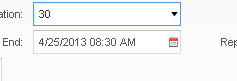
There might be some issue with date input field. We need to edit the css files to fix this problem. I got the same problem in vanila SRF also. Above image is before selecting/clicking calender Icon After clicking calender icon. You can see its length is increased. To solve this probelm, go to theme-base.css file in your " files " folder. .mceGridField input.siebui-input-popup {         max-width: 119px;     } Here   max-width: 119px is given as our input filed. If you need more than this width, you can alter this.