רשומות

Siebel Open UI: Collapsible Applets - Another Revisit

תמונה
By Jan Peterson During a presentation to the technical team of a customer who is in the progress of updating to Open UI, I showed how easy it is to make all applets collapsible by just adding some code to a postload event handler. We have looked at the general concepts in an earlier post : postload.js I quickly received a follow up question if it is possible to collapse applets automatically in case the applet doesn't have any records. As often in the new world of Open UI, the solution is very easy. Replacing oAppletPModel.SetProperty("defaultAppletDisplayMode", collapsed"); with oAppletPModel.SetProperty("defaultAppletDisplayMode", oAppletPModel.Get("GetNumRows") > 0) ? "expanded" : "collapsed"); does the job :-). A few notes: In the example I updated postload.js. For a production environment it is recommended to have a custom file that subscribes to the postload event ..   The postload event is only triggered if a user nav...

February Repost: Upgrade Helpers

תמונה
This is a repost from February 2009, seems that upgrading Siebel CRM doesn't go out of fashion anytime soon, especially with Innovation Pack 2013 . It appears that many of those Siebel consultants are busily upgrading and I think that timeframes are challenging as always ;-) The following command line utilities are here to help you during the upgrade and save your precious time (you'll need it for other tasks ;-). Please note that the list below is not complete. 1. Log Parser When Siebel Upgrade Wizard performs the Upgrade Database Schema (upgrep) and Upgrade Physical Schema (upgphys) and any other step against the database, it forwards the command line utilities' log files to a central directory, a subfolder of the Siebel Server's log directory. You can run the logparse executable from the command line and generate a nice and pretty html summary. The logparse utility is also useful to summarize tasks not related to an upgrade such as a repository migration (notorious...

Siebel Open UI: Alternating Row Colours

תמונה
With a huge hat tip to fellow Siebelite Duncan Ford, here is a quick solution to show rows in list applets with alternating colours. Like this: Duncan has provided the following CSS rules which, when added to a custom style sheet, do the trick. Totally without any JavaScript coding. .ui-jqgrid .ui-widget-content:nth-child(odd) {     background: #e4bf66; } .ui-jqgrid .ui-widget-content:nth-child(even) {     background: #f9e6b7; } tr.ui-state-highlight {     background:rgba(0, 0, 0, 0.2) !important; } .ui-jqgrid .ui-state-highlight, .ui-jqgrid .ui-widget-content .ui-state-highlight, .ui-jqgrid .ui-widget-header .ui-state-highlight {     background:initial; } As you can see, CSS can distinguish odd and even children of a selection. I have seen quite a lot of jQuery code which accomplishes the same (and of course allows for a more dynamic colouring). But you can't deny the purity and simplicity of CSS. Many thanks to Duncan for sharing this. have a ni...

Actuate Acquires legodo ag

תמונה
In his Siebel Observer publication, Bruce Daley informs us about the recent acquisition of Germany based legodo ag by Actuate . For seasoned Siebelians, Actuate rings a lot of bells as it was the primary reporting tool integrated with many versions of Siebel CRM until Oracle replaced Actuate Reports with its own BI Publisher tool. Actuate Corporation (NASDAQ: BIRT) has acquired legodo ag. Based in Karlsruhe, Germany, legodo develops software to allow organizations to tap into information stored in existing applications to create personalized customer communications.  More than 40,000 people have used the software in organizations like Deutsche Bahn, Deutsche Telekom, GEHE Pharmahandel, Lufthansa, Swisscom, Telenor, and Telefonica. The company has a catchy tag line - Now it's personal. “The acquisition of legodo extends Actuate’s offering with tight integration to Siebel among other packages,” said Steve Jones, Co-Vice President and Co-General Manager of the Content Services Group...

Siebel Open UI: Contact Tiles and Images

תמונה
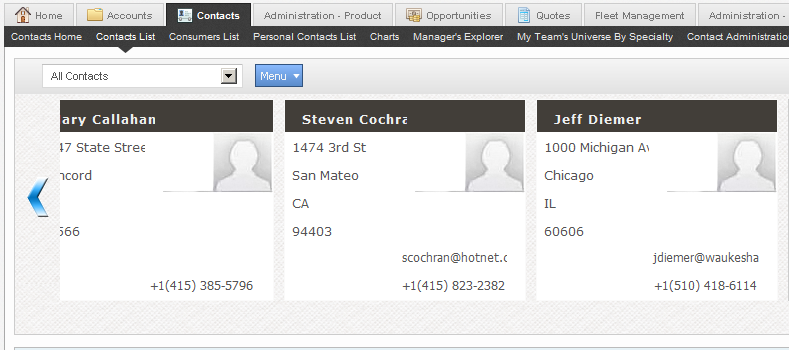
One of the many new features in Innovation Pack 2013 for Siebel Open UI are different visual display modes for list applets. Using tiles makes sense on mobile devices as they are easier to select by tapping. But also in desktop applications, tiles can make dull lists more visually appealing. The Contact List Applet for example comes with two new buttons which allow us to toggle between "Grid" (i.e. classic list) and "Tile" mode. Below is a screenshot of the Contact List Applet in tile mode taken using the Siebel Sample Database. Apart from the as-delivered fields such as full name, address, email address or phone number, the ability to store and display an image along with the contact data stands out. Alas, the sample database does not provide sample images... In addition, it is not too obvious how to add an image (or a reference/link) to a contact record at first glance. After a bit of investigation and with a little help from my friend and fellow author Jan, h...

Siebel Open UI Manifest Expressions and System Preferences

תמונה
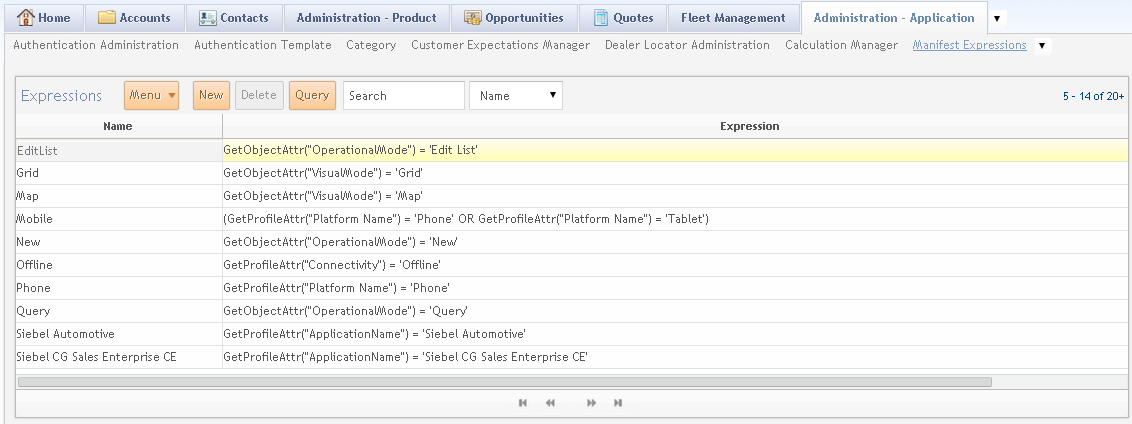
Introduced in IP 2013, Manifest Expressions can be used to evaluate conditions whether a certain set of JavaScript files or a certain web template file should be loaded for a given user interface object. Oracle ships some interesting standard expressions: Some Siebel standard Manifest Expressions in 8.1.1.11 We can inspect those standard expressions by navigating to the Administration - Application screen, Manifest Expressions view. Most of the standard expressions use either the GetProfileAttr() method or the new GetObjectAttr() methods to match the value of either a profile attribute or an attribute of an applet with a string. My first impression was that obviously we can use Siebel Query Language to construct complex expressions. So I started experimenting... One of my first experiments was built on the idea that it could be worthwhile having a central "switch" for enabling or disabling Open UI customizations. Here is the cookbook I came up with: 1. Create a System Pr...

Siebel CRM Patchset 4 for Innovation Pack 2013 Released

תמונה
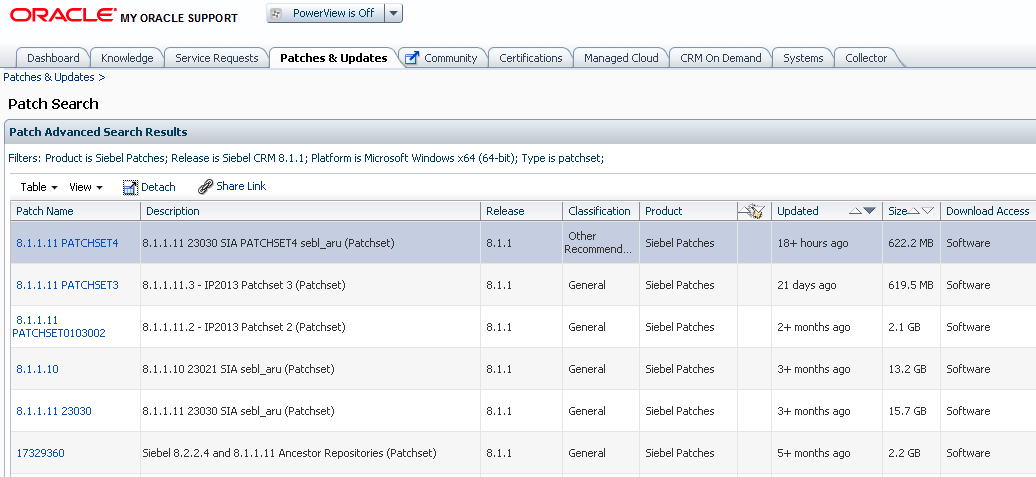
Yesterday, Oracle has released the 4th patchset for Siebel CRM Innovation Pack 2013 which provides cumulative fixes and features for Siebel 8.1.1.11 and 8.2.2.4. The official version numbers are 8.1.1.11.4 and 8.2.2.4.4. (a feast for numerologists ;-) As a frequent reader of this blog, you are aware that Oracle has started shipping monthly patchsets for the latest Siebel Innovation Pack releases. As with all patches, the package is available for download on My Oracle Support. The Readme document combines release notes and installation guide. Good old opatch is taking care of placing the new files onto your disk, so make sure you follow the instructions to avoid surprises. Here are some areas which benefit from the patchset in terms of issues addressed: Siebel Order Management Open UI Mobile Applications (connected and disconnected) have a nice patch @lex