רשומות

Five Timeless Rules for Successful Siebel Projects

תמונה
While the near and not-so-near future for Siebel CRM is truly exciting, with so many new things coming up to learn and write about, it is worthwhile to sit back and browse the archives. Five years ago, after OpenWorld 2009 (!), I cross-posted an article from the Oracle Customer Experience blog (formerly known as CRM Product Marketing blog). This is what I wrote back then: Stating the obvious... After all these years, thousands of Siebel CRM  implementation  projects and so much experience of thousands of experts in the field, I can't believe that there are still many Siebel CRM projects which ignore one or all of these  five simple rules for a successful Siebel CRM implementation  (Credits to Divya from the  CRM Product Marketing Blog ): Standardize on tools and languages Keep customization to a minimum (yes a MINIMUM) Involve end users Communicate with others who have done it before Implement regional or online training for end users Remember: These...

Siebel CRM Patchset 12 for Innovation Pack 2013 is Available

תמונה
Last Friday, Oracle has released patchset 12 for Innovation Pack 2013 marking one year since the inaugural release. A quick glance at the Readme document (aka Installation Guide) puts this patchset into the 'lots of bugfixes' category, just like the previous one. have a nice day @lex

Oracle OpenWorld 2014: Strategy and Roadmap for Siebel CRM

תמונה
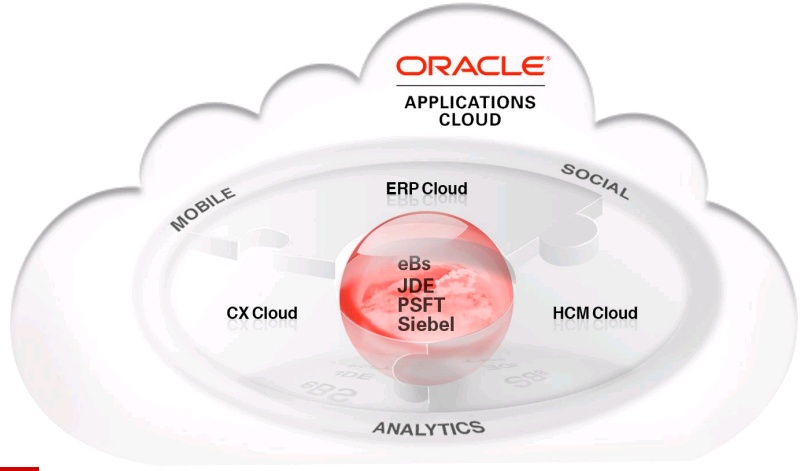
Two weeks ago, at Oracle OpenWorld 2014, Oracle held several sessions which focused on the future of Siebel CRM - the world's most complete CRM , as we call it. Our friend and fellow blogger Richard was at the premises and shared many exciting articles (and screenshots) with us. Now that the dust and excitement has somewhat settled, it's time to reiterate Oracle's statements. Siebel CRM is at the Center of the Cloud (and it's not Alone) An image says more than a thousand words. The following is taken from an Oracle presentation. Personally, I think that this is the most important diagram for Oracle Applications customers at the moment. Oracle, their customers and partners are on their way of bringing decade-long investments in gargantuan on-premise deployments of eBusiness Suite, JDEdwards, PeopleSoft or Siebel CRM to the ever so promising cloud. And the reality is that for most deployments of huge enterprise-class applications with millions or even billions of transac...

Speech To Text Awesomeness in Siebel Open UI - Part 2

תמונה
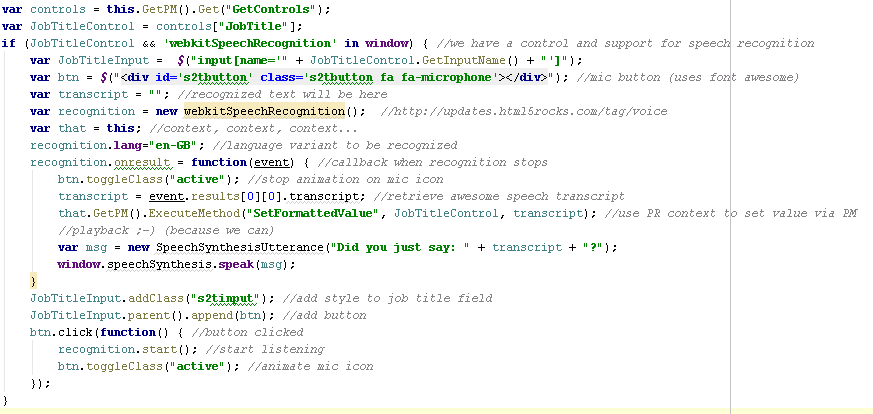
Welcome back to the second and final part of our speech to text tutorial (complete with awesome fonts). In the first part , we created a custom PR for the Contact Form Applet and put all the Font Awesome files in the right places. Today it's time to tackle the PR code in earnest. Remember we want to achieve the following: Display a microphone button in a text field using a scalable icon by  Font Awesome Allow speech input using the  HTML5 Web Speech API Animate the microphone icon during recording with  CSS animation Write the recognized text to a field according using the Siebel Open UI API (of course) Play back the recorded text using the  HTML5 Speech Synthesis API So let's open our primordial physical renderer and implement the following code inside the ShowUI method: Click to enlarge (yeah I know, it's just a screenshot) Grab the full code here . Let's walk through the code line by line: First, we 'get' the GetControls property to initialize the controls ...

Speech To Text Awesomeness in Siebel Open UI - Part 1

תמונה
If you have been following the various articles in the Siebel Open UI realm over the past two years you have probably seen a demonstration of speech recognition to provide field values via the device microphone. The example code with this demo boils down to one line like this: $('input[name="' + controlInputName + '"]').attr("x-webkit-speech","x-webkit-speech"); The above code is adding the x-webkit-speech attribute to a text input control so that we can simply click or tap a microphone icon and start speaking. Note that only Google Chrome supported this feature. Supported? Read on... As you also probably know, this humble writer and his fellow authors are working on the Siebel Open UI Developer's Handbook (to be released early 2015). Of course, we aim to provide as many working examples as possible and the speech-to-text demo is something we have on our list. However, while creating the demo code for the book we found to our dismay t...

Oracle OpenWorld 2014 - Back to the Future

תמונה
Having to watch Oracle OpenWorld with several time zones between me and San Francisco has the benefit of getting enough sleep and waking up to interesting news. Again, we have to thank our friend Richard for going the extra mile of providing us with fresh-from-the-oven news from the Siebel sessions. Some of the announcements sound like from another planet indeed. Artist from 1900 imagining 'Aero-Cabs' in 2000 So will we have something like flying taxis anytime soon? Probably not. But will we have Siebel Tools in a browser? Maybe that's not so far away. http://localhost/tools_enu: we will probably sooner have this than flying cabs. Obviously we are close to a radical shift in the way we work with Siebel CRM. From Richard's post , here are some highlights of the near future of Siebel, some of which were already mentioned in an earlier article. The general idea is to web-enable the Siebel Tools application , which - when you look at it in the current Siebel Tools fat clie...

Simplify Your Life with Functional Setup Manager

תמונה
When you find yourself in the admin seat in front of Oracle Fusion Functional Setup Manager (FSM), you might have a lot of tasks to juggle. What most admins do is to simply search for the task like this: To give FSM some credit, the search is case insensitive and retrieves any task (or task list) that contains the search string. Personally, I found myself more than once in the situation where I mistyped or plainly forgot the "key word". And scrolling is not an option... Custom Task List to the Rescue! With kudos to fellow Oraclean Kevin, we can of course resort to creating a custom task list. Just go to Manage Task Lists and Tasks and click the Create Task List button. Name your task list and add any existing task: Once you're done you can start using your custom task list in FSM and forget about remembering task names. have a nice day @lex