רשומות

SESSION SQL

Disclaimer: This post may not appeal EIM war horses but might be of some interest to newbies in EIM. There are two types of Data, the one you look up and the one you make up. EIM is the technique which is used for the later type. As per siebel Bookshelf "Siebel EIM manages the exchange of data between Siebel database tables and other corporate databases". The EIM process constitue of two major steps: 1 - The data is first copied from external source(external table, csv , excel) into the interface tables. 2 - This data from the interface tables is then loaded into predefined destination columns in the base tables using the configuration file. This configuration file, popularly known as ifb file, hosts the magical words which can be used to import, update, delete, extract, merge data. A more detailed list of paramters is available in bookshelf. One of the interesting parameters in the list is "SESSION SQL" which can perform operations after the EIM execution. This can...

Hierarchy Extraction ++

תמונה
This is an extension to my previous post regarding Hierarchy Extraction which compares different ways to extract property sets. I have quoted in the earlier post regarding the length limitation(75 characters) of Workflow Utilities echo method using dot notation. But Siebel never run out of altervatives and each one gives me something different. In order to overcome the length limitation of the dot notation one can make use of "Aliases" which lasts upto 255 characters. Workflow Processes can have Process Properties of type "Alias" (ignorant me). Basically this data type acts as a pointer to a specific attribute inside a Property Set. So in order to fetch Sr Number or Account Id, mentioned in previous post, we have to define two process properties of data type "Alias" with Default value as below SR Number: SiebelMessage/ListOfService/Service Request/@SR Number Activity Id: SiebelMessage/ListOfService/Service Request/ListOfAction/Action/@Activity Id In the w...

Prompt:Browser Script::LoadPopupApplet:Server Script

תמונה
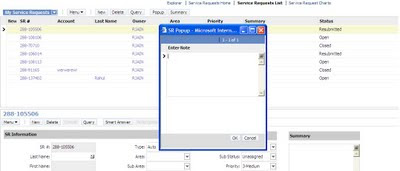
Whether we can repeat browser side capabilities via server side, like Alert/Prompt, always charms any developer. Server side "Alert" is beautifully explained on the siebel Impossible scriptless challenge using "LS SubjectVisits Service" business service with "ShowConfirmationDlg" method. Recently i was asked to implement Prompt sort of functionality using server side code. After some hits and lots of misses i came up with not so beautiful solution but it worked. Lets consider a scenario where on click of "Summary" button, code should check the status of Service Request if it is "open" then it should prompt user to enter notes and capture these notes and put it in the Summay of service request. The solution is blend of List of Value BC and pop up applet. I found a business service "SLM Save List Service"(thanks to Google again...wonder what life would have been w/o Google...) which could be used to invoke a popup applet from s...

Siebel Power User - Part 1

תמונה
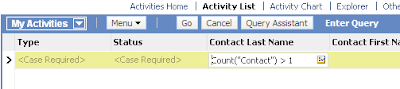
Hey Folks, Here is the first of the many Siebel power user series to come. Just recently discovered a few cool features in Siebel from an end user perspective. Many a times the user is required to update multiple records of data based on a condition, that the user would normally not know how to execute simultaneously. For instance, I recently had to update a few(not really) activities in Siebel under a condition where the activity had just one contact associated to it. How would an end user go about making this change? Lets discuss two such "Good to knows" in the following scenario The Requirement - Lets say you have to update the status of 100 or so activities which do not have more than one contact. The Trick - Go to the Activities applet, and use the below query on the Contacts field Count("Contact") > 1 Note: Contact is the MVL used in the Contact MVG This will give you all activities with more than one contact association. Now, lets update the Type of the A...

Fetching IP Address in Siebel

תמונה
Security is like superstition. Hits are always counted while misses doesn't. Recently i was asked to enhance security measure of our siebel ebusiness applications by tracking the IP address along with the login of the client. The first thought that came to mind was @#$@#$@# but then again why-to-fear-when-google-is-here happened. I found a lesser heard OOB business service which returns the session variables, cookies information and many more useful stuff. "Web Engine HTTP TXN” business service can do the trick for you. Details of this BS is avialable on the support web in "TECHNICAL NOTE 317". "GetAllServerVariables" and "GetServerVariables" are key methods here for fetching the Login and IP address respectively. I followed below steps in order to capture the IP address of the logged in user. 1 - Create a action set which calls a workflow. In this workflow we will have two steps: First step calls " Web Engine HTTP TXN " with method ...

SBL-EAI-50187: The file '%1' does not exist.

Applies to: Error Message Area:Application Integration Infrastructure, Enterprise Application Interfaces - EAI Version:Siebel 8.1 Purpose This document is intended to provide cause and corrective action information about Siebel Error Message SBL-EAI-50187: The file reference '%1' does not exist. Scope This document is informational and intended for any user. SBL-EAI-50187: The file reference '%1' does not exist. Explanation The specified file cannot be found on the file system. Corrective Action Check whether the specified file exists and whether the user temporary directory is defined and accessible. Applies to: Siebel System Software - Version: 8.0 [20405] and later [Release: V8 and later ] z*OBSOLETE: Microsoft Windows Server 2003 Product Release: V8 (Enterprise) Version: 8.0 [20405] FRA Pub Sect Database: Microsoft SQL Server 2005 Application Server OS: Microsoft Windows 2003 Server Database Server OS: Microsoft Windows 2003 Server This document was previously publi...

SBL-EAI-50177: Error getting the size of file reference file '%1'

Applies to: Error Message Area:Application Integration Infrastructure, Enterprise Application Interfaces - EAI Version:Siebel 8.1 Purpose This document is intended to provide cause and corrective action information about Siebel Error Message SBL-EAI-50177: Error getting the size of file reference '%1' Scope This document is informational and intended for any user. SBL-EAI-50177: Error getting the size of file reference '%1' Explanation Cannot get the size of a temporary file. Corrective Action Check whether the specified file exists and is readable.