רשומות

Top 10 Out of the box features in Siebel !

It is a great feeling that one can have if he keep listening some good things from the users for which you are building the product/application. I have observed so many times the reaction of the users during the Siebel demo when they keep saying, "I just love this application :) ". The best part is that Siebel has got so many OOB features in place which comes with the product bundle and user can

Generate pdf report with Images in CRM On Demand

תמונה
Hi, I had a requirement where the client had to display their company Image on pdf when the report was downloaded, the Image I was referencing was on their Company Portal. unfortunately the pdf file wouldn't pick this image, it worked only for HTML downloads. Here is how you do it! You can get Images from websites into your pdf file, but this will include two extra clicks... Go to any report, click the “Printer Friendly” option, and select HTML.    An HTML webpage will be generated for that report, now in that web page in the Menu bar, go to File and select Print…   The below popup screen will be displayed, select “Adobe PDF” and click Print. After you click Print you will have to save the Report, the save as type is automatically set to PDF, enter the Name .    And your pdf is generated will the Company logo. Cheers!

Repository Script Extractor for Siebel versions > 7.7

תמונה
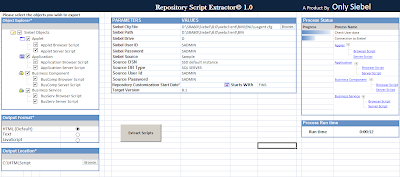
Hey folks, Want to have a backup of all those cool and interesting scripts you wrote, but find it too taxing to manually copy each and every script in to a good readable format? Here is a new tool the we have been working on. What it basically does is, it extracts the scripts based on a user given date or a prefix. Any scripts that were created or updated beyond the date will be exported into the excel sheet as well as in an HTML format just like the utility Oracle had introduced to extract scripts for versions 7.7 and earlier. The tool connects to Siebel via the object layer and pulls out the information... Here is a peak at what this tool looks like Main UI HTML Output Click the below icon to download this cool tool..! Cheers!

Siebel CRM Market Statistics

תמונה
Hey Folks, A few graphs I'd like to share about Siebel CRM and its demand in the market.                         Siebel World Wide Demand                       Siebel – Favourite Cities                         Siebel Salary Comparison                        Siebel – Skills based demand trend So for those of you who are not so sure on which area in siebel to pick up, this could give you a heads up... Some More Graphs Cheers!

The Siebel Blackbook

Abstracting Database Passwords in Batch Scripts

Even when a Siebel implementation does not need to be SOX compliant, it is still important to develop and maintain processes to reduce errors and fraud. Separation of duties (SoD) is an important security principle in any enterprise application environment. For example, it is often best to prevent Siebel Developers from having administrative access, and to prevent Siebel Administrators from changing code. One potential vulnerability is that command-line server manager connections require a username and password that authenticate against the Siebel database. People with this information can use a third-party tool to access and manipulate the Siebel database. In a production environment, administrators need these passwords, but they should be restricted as much as possible, especially from developers. Scripts invoking the Siebel Server Manager command-line interface can be a powerful tool for automating server tasks, but connecting to the command-line interface on a Windows server r...

Oracle CRM On Demand and Google Talk

תמונה
Word 12" name="Originator"> Hey Guys, If you are a Google Talk user, you may be aware that there is a link that allows you to sign into your Google account and chat with your contacts without the GTalk setup installation. We are about to use this cool feature in Oracle CRM On Demand to help Service Reps to chat with customers to resolve their queries. This feature may also be available for other messengers (yahoo, rediffmail, windows live), but let’s talk about Google for now.     Step 1:   Navigate to Admin---Application Customization---Global Web Applets.  Create a New Web applet and Fill in the below. You may also choose to have this on the Homepage according to your requirement. URL: http://talkgadget.google.com/talkgadget/popout ? Step 2:  Add the Custom Web Applet to your Action bar for the ‘My Setup---Personal Layout---Action Bar Layout’ Global link. ...